Case studies

01

LMS workflowsAccessibilityCourseware QA
Mandated Reporter Training website mockup displayed on a desktop monitor

Designing role-based workflows and accessible courseware

Mandated Reporter Training

As a UX/UI Producer at GROW Design & Development, I helped clarify admin flows, learner access, compliance training, accessibility support, and developer handoff.

Contribution
UX/UI production, LMS mockups, courseware, accessibility testing
Context
Professional work at GROW Design & Development

The challenge

Mandated Reporter Training had to support learners, administrators, employers, developers, and compliance stakeholders. The design challenge was clarifying how the LMS should behave across roles, permissions, password recovery, certificates, training completion, and accessible courseware.

My role

As a UX/UI Producer at GROW Design & Development, I created LMS mockups, produced Storyline 360 courseware, authored and designed learning assets, and conducted accessibility testing and regulatory research.

  • Created LMS mockups and user flows for administrative tasks.
  • Documented role editing, password recovery, and super admin reset flows.
  • Produced and modified courseware content in Articulate Storyline 360.
  • Tested courseware and platform behavior to identify deployment issues.
  • Authored a Voluntary Product Accessibility Template (VPAT) for the courseware Accessibility Conformance Report.
  • Conducted Section 508 accessibility testing with JAWS across state-mandated training modules.
  • Researched California, Nevada, and Pennsylvania legislation to inform clear instructional flows.
  • Authored, copyedited, and visually designed courseware scripts and learning assets.

Development context · California’s training system

From fragmented courses to a connected service

CDSS and OCAP partnered with Simple Learning Systems to modernize training previously spread across websites, without learner accounts or accessible, mobile-friendly delivery. The 2023 cloud migration preserved learning histories. Simple reports halving runtime in most courseware.

These platform-level developments make continuity, efficient instruction, and dependable account states central design considerations.

Source: CDSS case study ↗
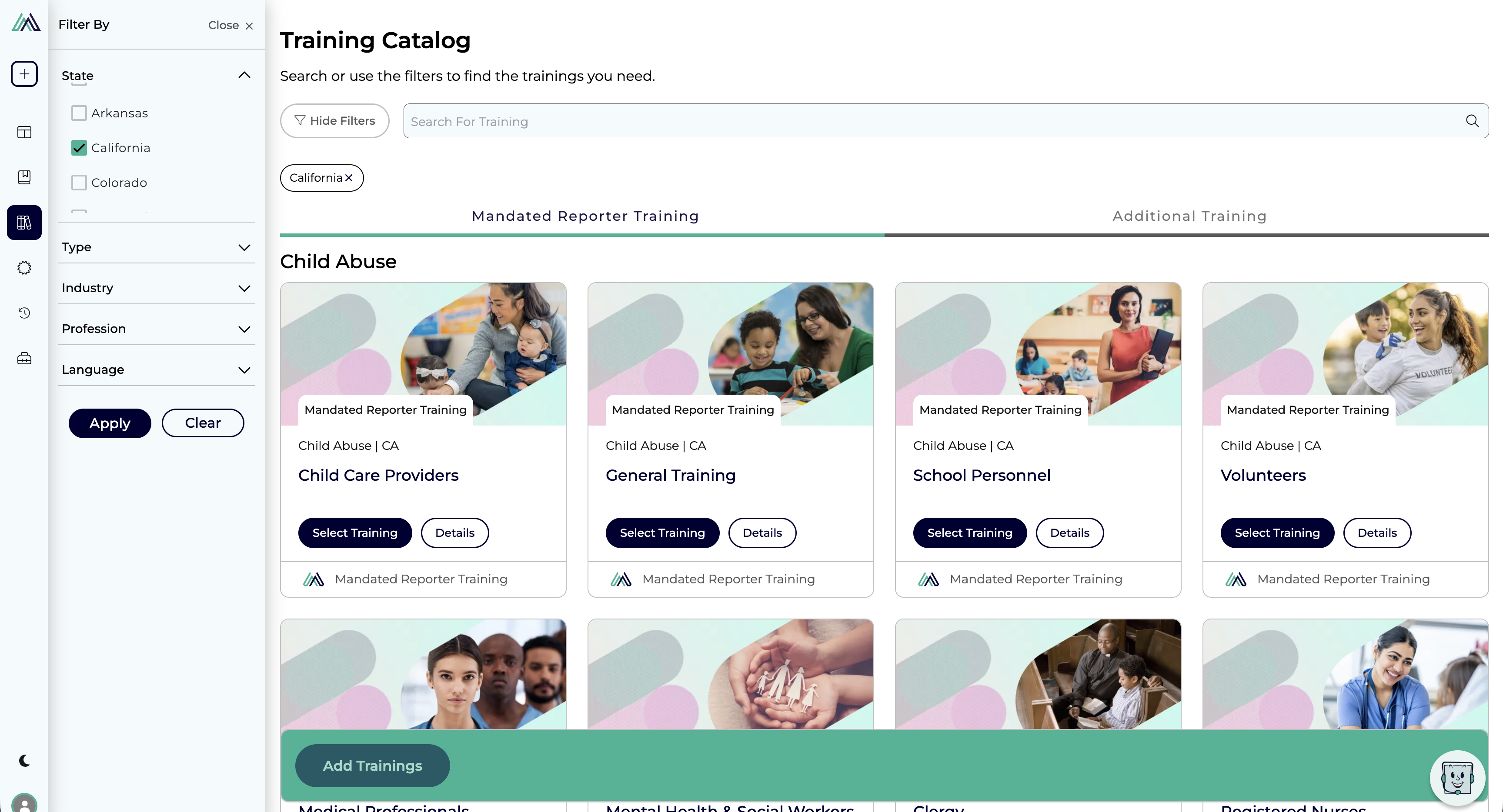
Training catalog with California selected and profession-specific course cards
Course discovery · Filters connect learner context to relevant training. · Select image to enlarge.

Learning journey / 01

Find the right learning path

The catalog makes a complex training offering navigable through state, profession, industry, type, and language filters. Visible selections help learners understand which requirements their course is intended to address before they begin.

Occupation-based personalization surfaces relevant courses while retaining access to the full catalog. The design consideration is to reduce search effort without hiding alternatives. CDSS case study ↗

Legal requirements lesson with a gavel photograph and Legal resource label
Orientation · Place the purpose and responsibility before the detail. · Select image to enlarge.
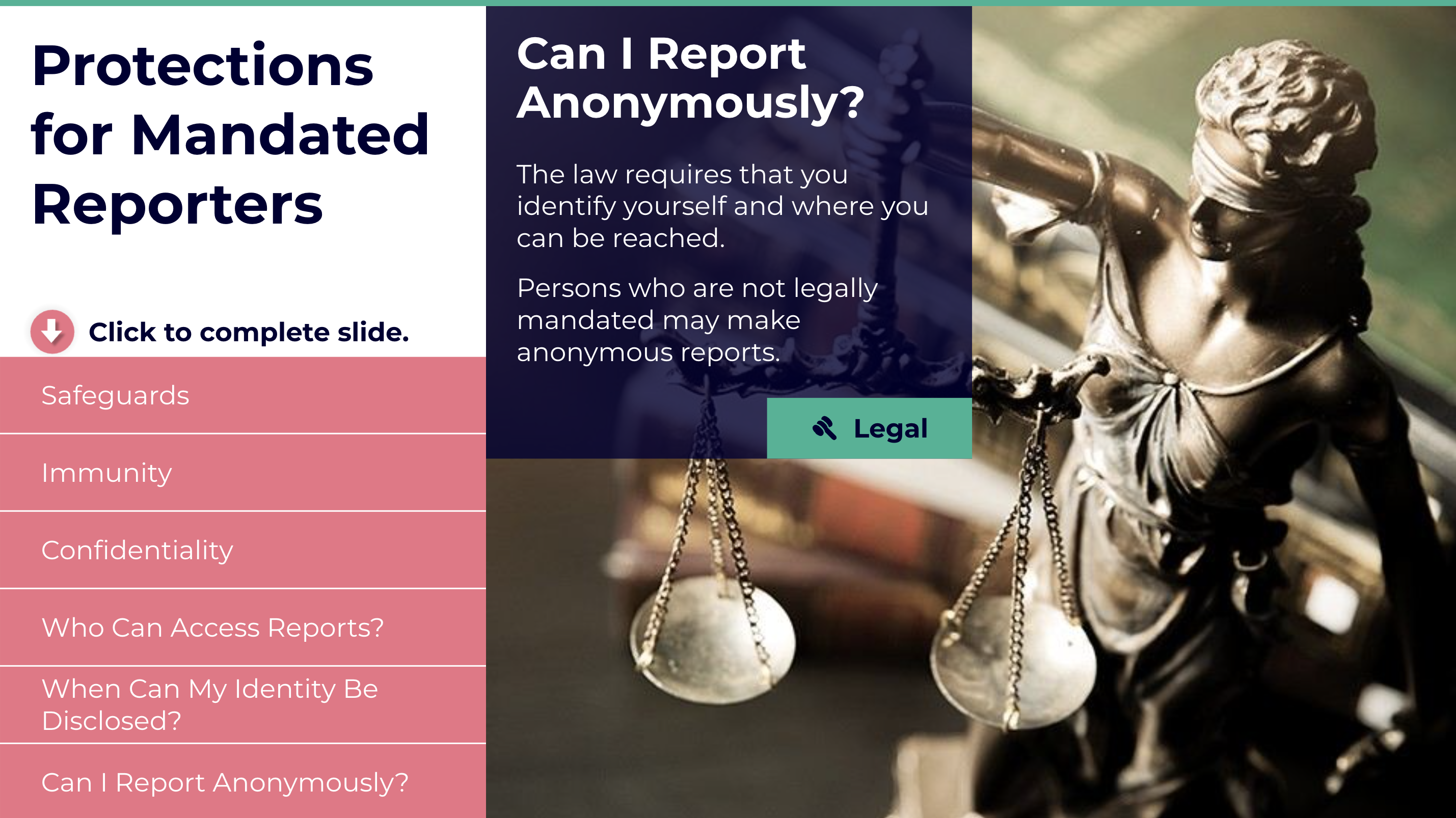
Explore reporter protections
Protections for Mandated Reporters screen with topic navigation and an anonymity explanation
Reporter protections · Topic navigation separates safeguards, confidentiality, and identity questions. The selected topic stays beside its explanation, supporting focused review without leaving the lesson · Select image to enlarge.

Learning journey / 02

Establish the responsibility

The legal requirements screen establishes why the learning matters before introducing abuse categories. A consistent resource label connects the lesson to supporting information. In this portfolio, these screens demonstrate course structure and content presentation; reporting requirements depend on jurisdiction and role.

Legal references moved into a web database available inside and outside the course, separating reference lookup from the learning sequence. CDSS case study ↗
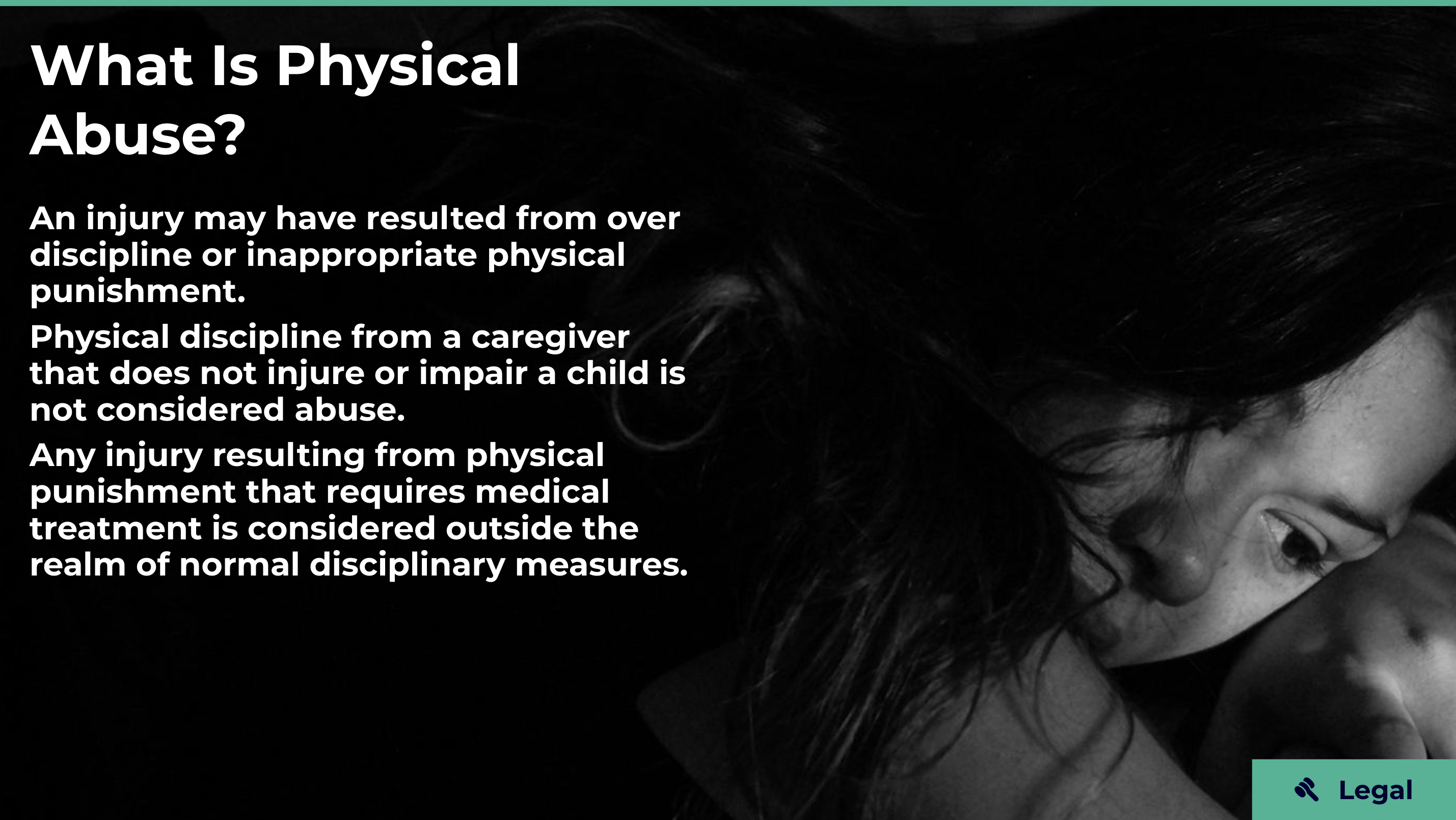
What Is Physical Abuse lesson screen
Foundations · Define the concept before asking learners to interpret signs. · Select image to enlarge.
Explore the related definition screens
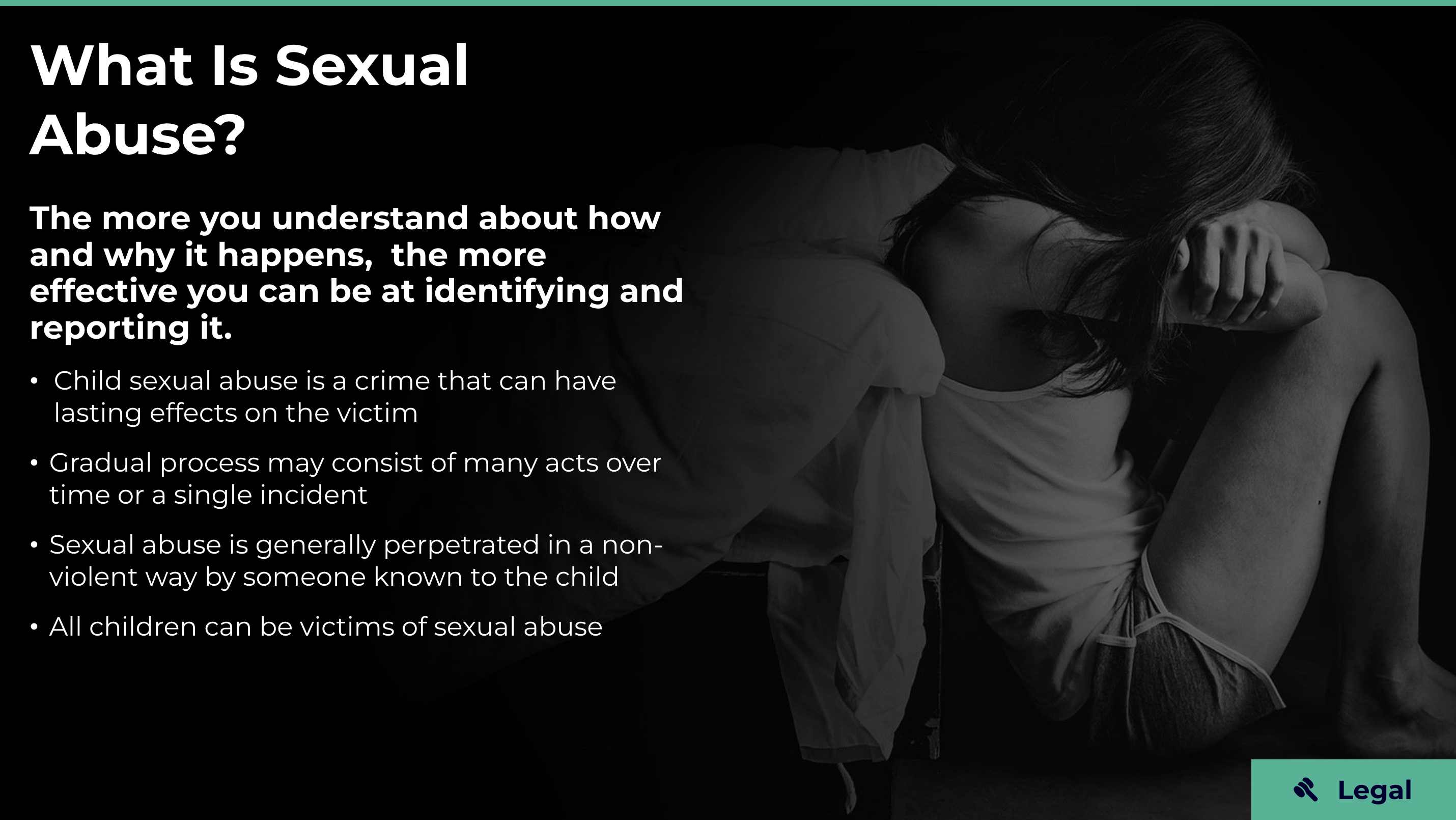
What Is Sexual Abuse lesson screen
Sexual abuse · Continue the same instructional pattern. · Select image to enlarge.
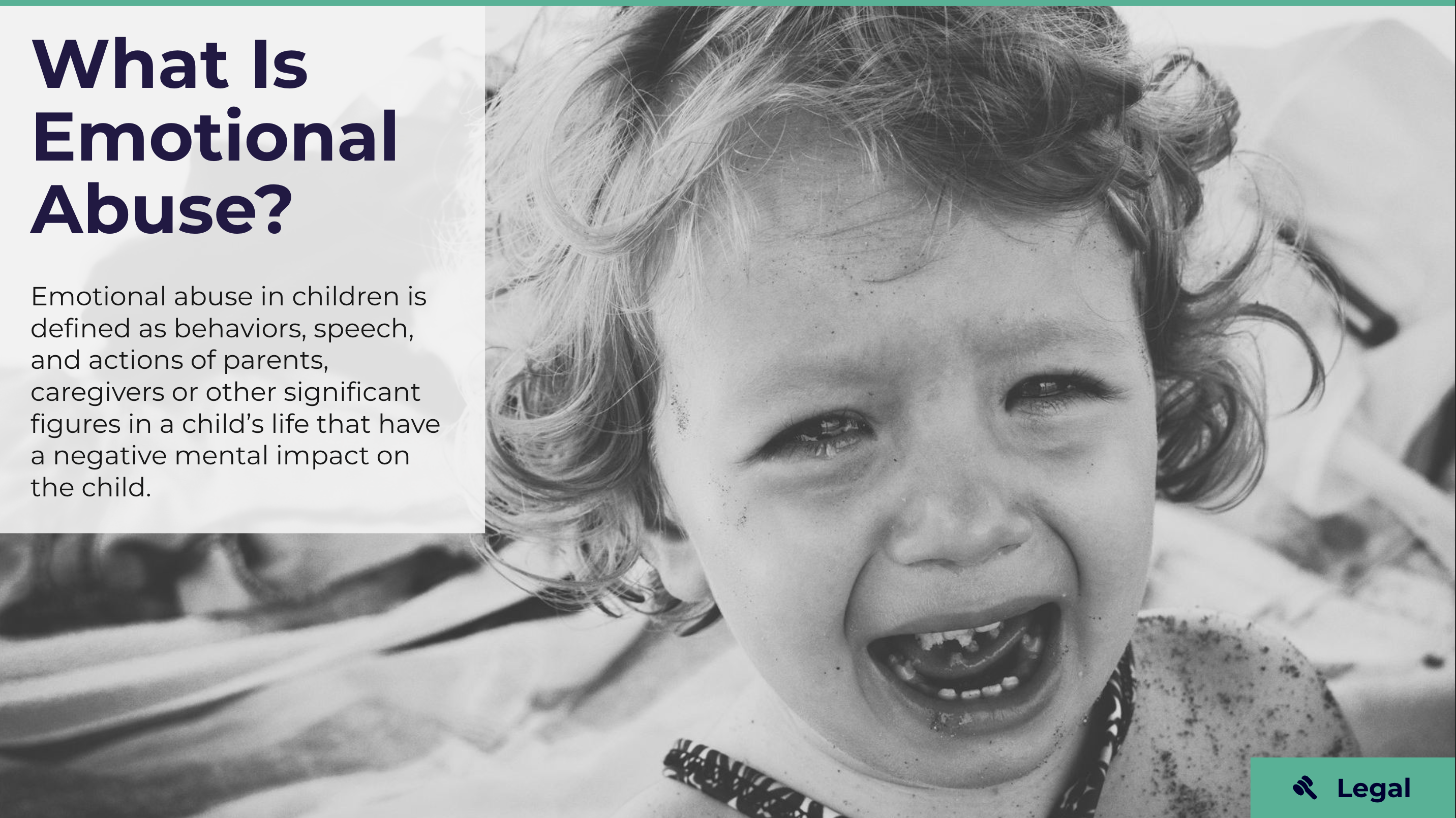
What Is Emotional Abuse lesson screen
Emotional abuse · Extend recognition beyond physical injury. · Select image to enlarge.

Learning journey / 03

Build a shared vocabulary

Definition screens introduce physical, sexual, and emotional abuse in a recognizable visual system. Clear headings, short explanatory blocks, and consistent resource placement help learners orient themselves as the subject changes. This foundational layer prepares them to interpret more nuanced situations.

Adult Behavior Red Flags screen with expandable content rows
Interaction · Progressive disclosure organizes supporting detail. · Select image to enlarge.
Explore context and recognition screens
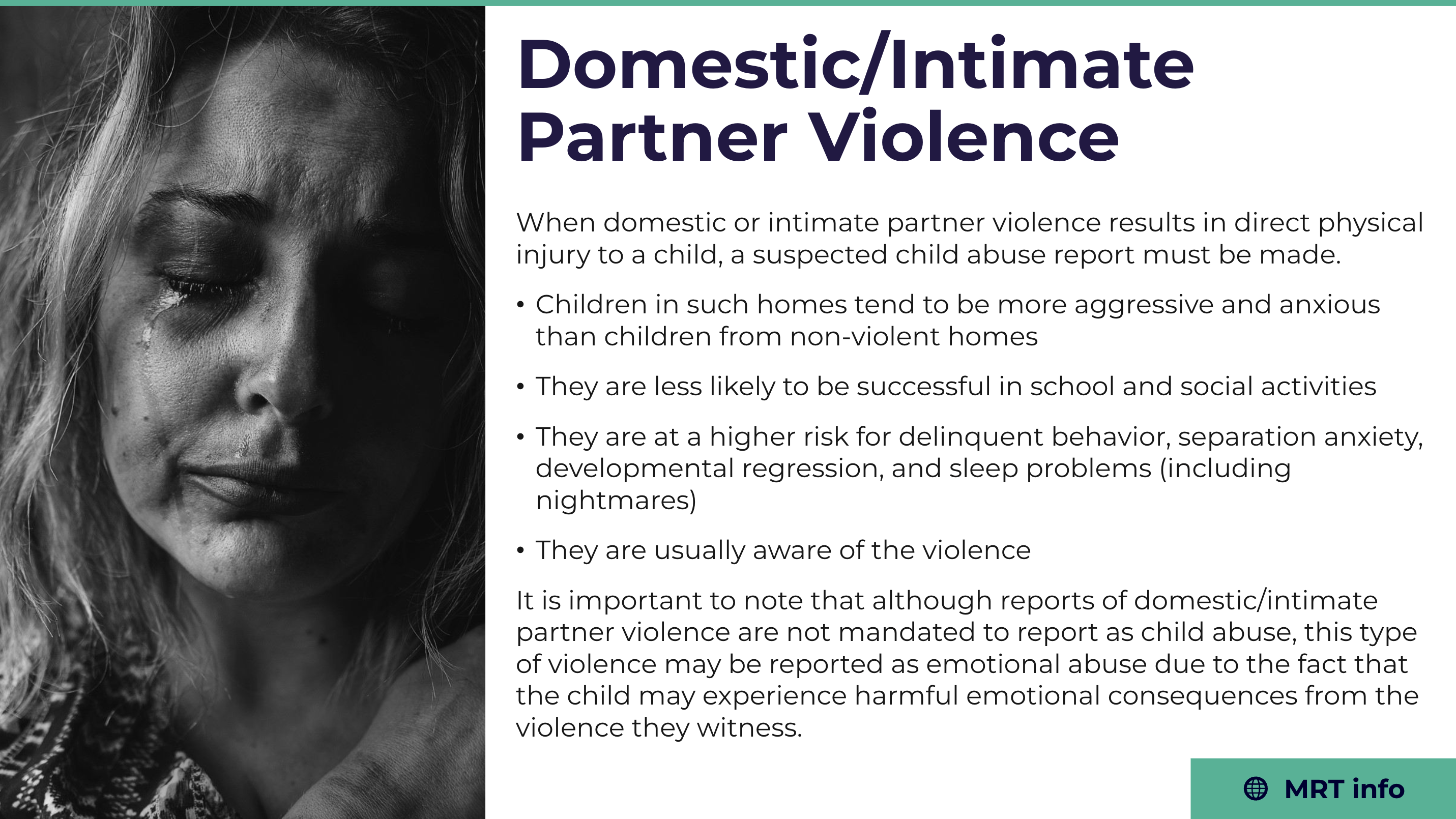
Domestic and Intimate Partner Violence context lesson
Context · Connect individual indicators with a broader situation. · Select image to enlarge.
Learn the Signs of Willful Harming screen with five expandable topics
Recognition · Group related indicators into discrete learning steps. · Select image to enlarge.
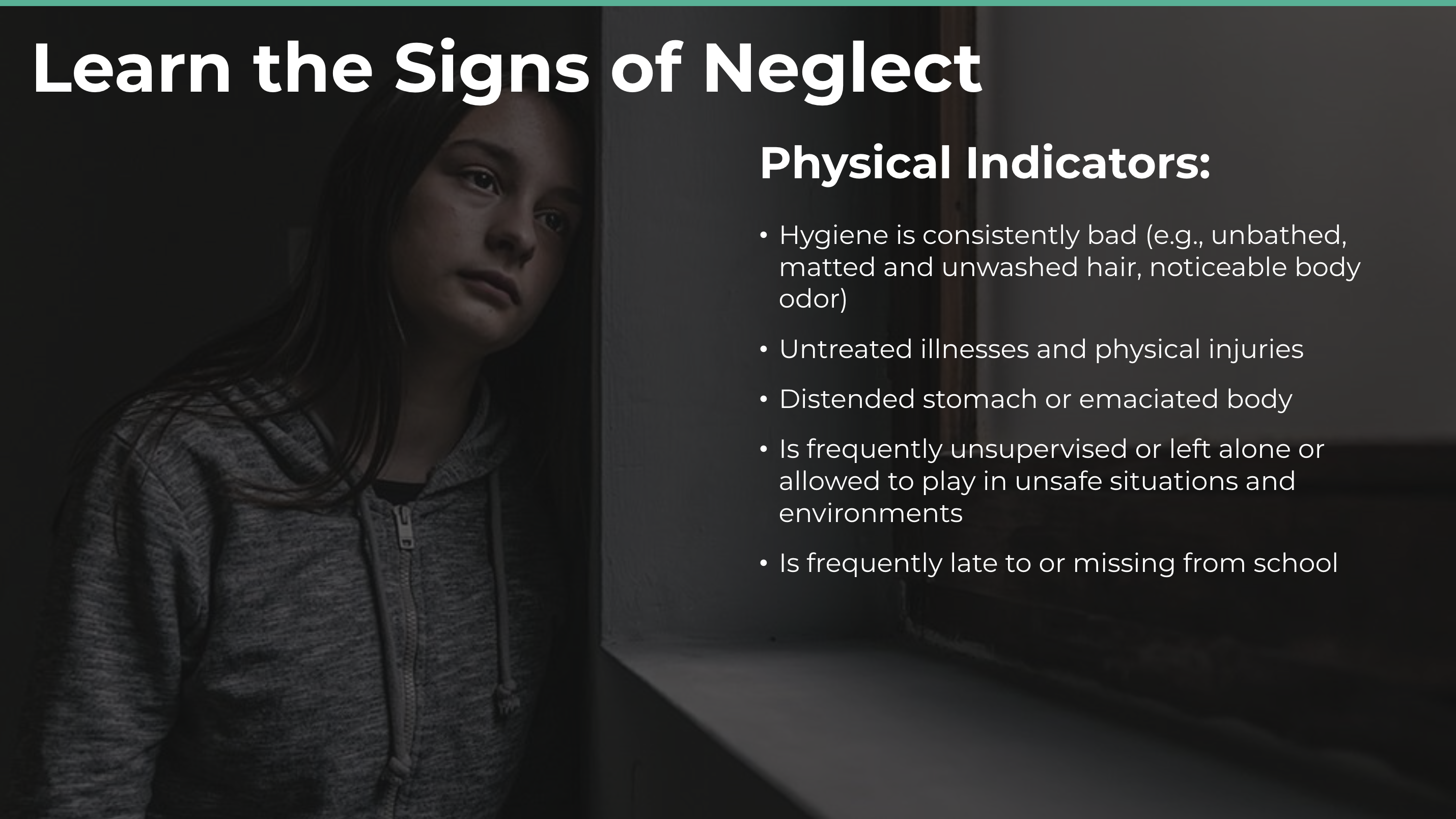
Learn the Signs of Neglect: physical indicators
Physical indicators · A prominent category heading and scannable list organize the lesson’s examples for review · Select image to enlarge.
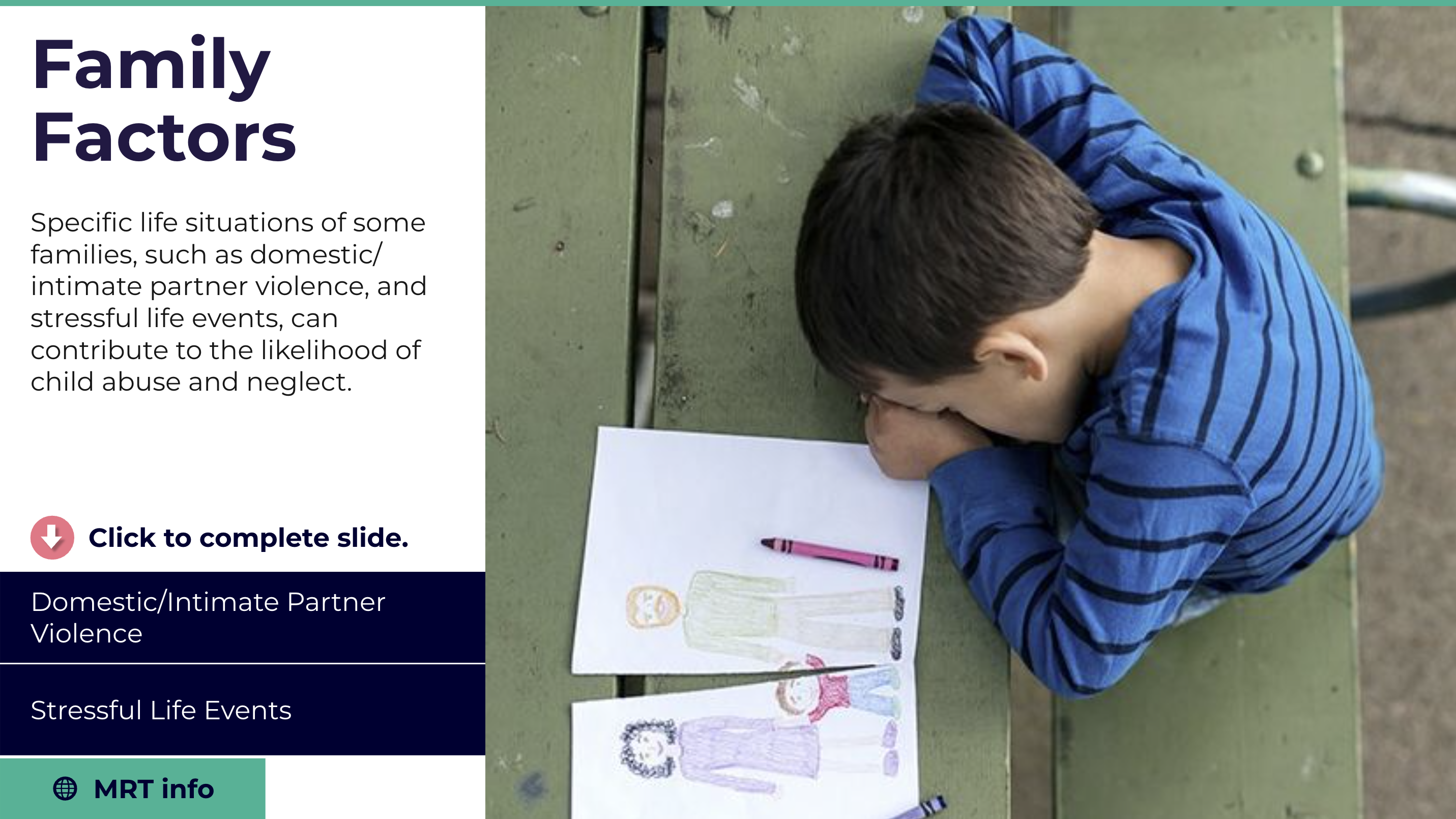
Family Factors screen with expandable topics
Family context · Expandable topics introduce contextual information in smaller portions, with a visible route to supporting MRT information · Select image to enlarge.
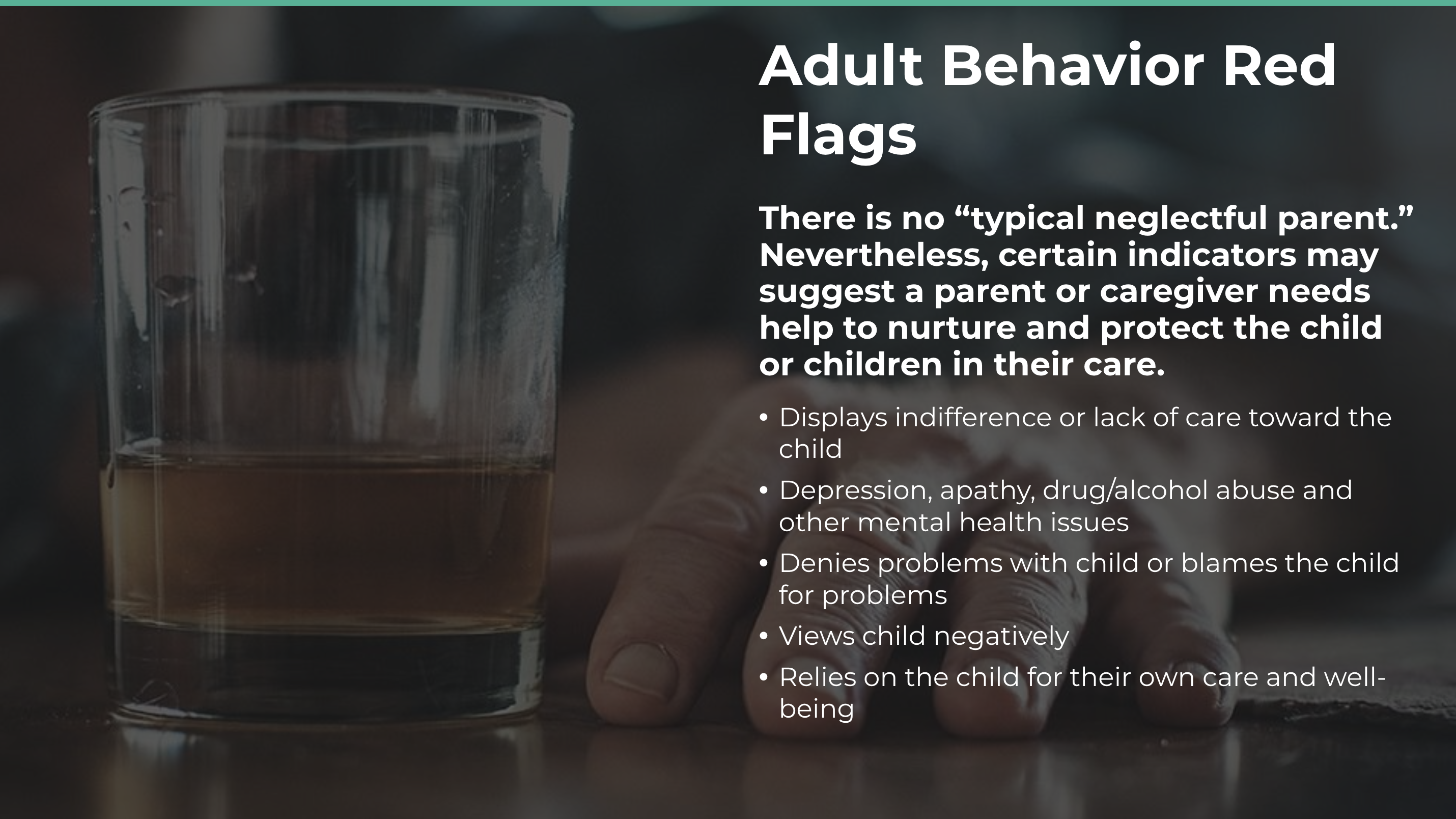
Adult Behavior Red Flags lesson about caregiver indicators
Caregiver context · A framing statement precedes the list, distinguishing the introduction from the supporting examples. This adds another content pattern to the recognition sequence · Select image to enlarge.

Learning journey / 04

Move from definitions to recognition

Expandable sections break longer lists of indicators into manageable pieces. Explicit completion prompts make the expected action visible. Related context screens then show how signs may appear within broader family circumstances. For interaction design, the key is connecting content, action, and progress without making the learner guess what to do next.
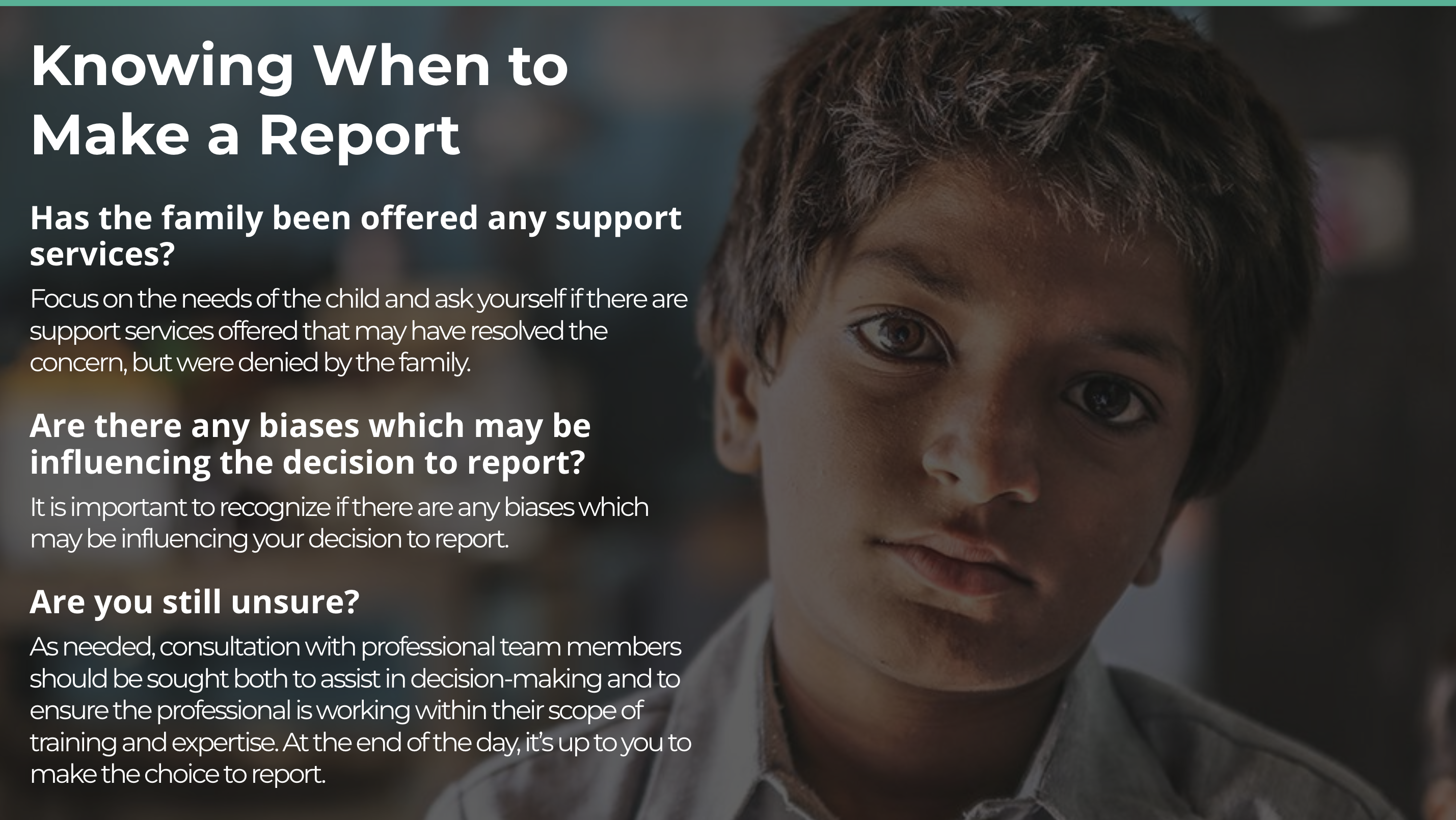
Knowing When to Make a Report lesson with prompts about support, bias, and uncertainty
Application · Bring the learning back to a consequential real-world decision. · Select image to enlarge.

Learning journey / 05

Support a considered decision

The reporting-decision screen shifts from definitions to reflective prompts about support services, bias, and uncertainty. It illustrates the challenge of presenting sensitive information clearly while keeping the learner’s responsibility visible. My work on courseware production, accessibility support, and QA helped connect these learning screens to a dependable LMS experience.
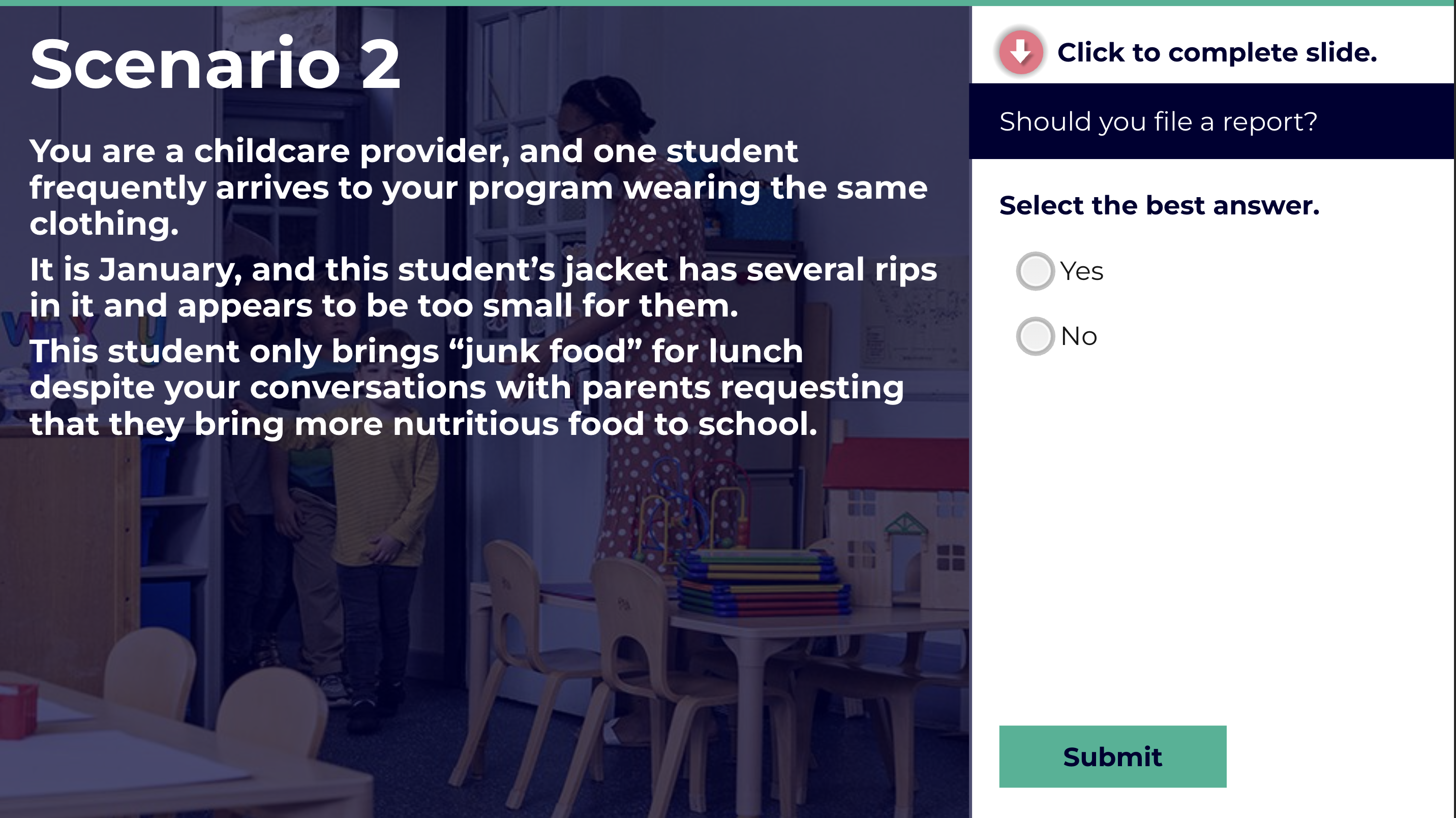
Scenario 2: childcare situation with Yes and No choices and a Submit button
Scenario practice · Separate the situation from the response controls · Select image to enlarge.

Learning journey / 06

Apply learning to a concrete scenario

This practice screen places a childcare scenario beside a clearly separated response panel. A single-choice answer and explicit Submit action give the interaction a predictable sequence: read, consider, select, and commit. Its place after the recognition and decision material shows how the course moves from explanation into application. The screenshot documents the question state, rather than an answer or feedback outcome.
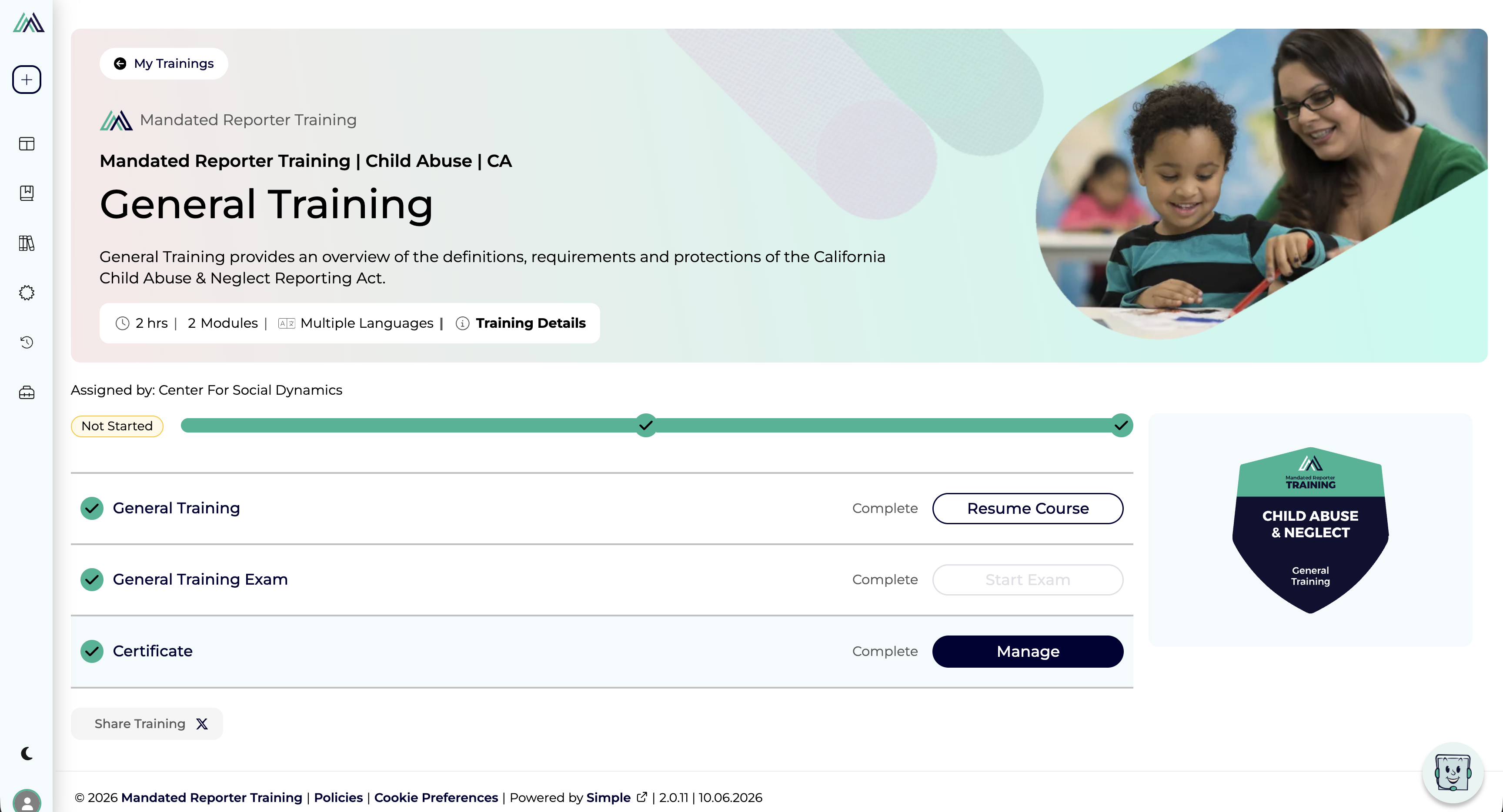
General Training LMS page with course, exam and certificate rows
LMS overview · Bring learning, assessment and completion records together · Select image to enlarge.

Learning journey / 07

Connect course activity to the learner’s next step

The training overview brings the course description, duration, module count, language availability, and assignment context into one place. Separate course, exam, and certificate rows pair status labels with actions such as Resume Course and Manage, so returning learners can identify where to continue. The captured page also shows a “Not Started” badge alongside completed rows, a useful example of the cross-screen state consistency that LMS QA needs to check.

From learning to documented completion

The platform supports compliance through state- and profession-specific courses, completion tracking, and downloadable, shareable certificates with QR verification. Its California training is developed with the California Department of Social Services, Office of Child Abuse Prevention. These features connect relevant instruction with evidence of completion; the appropriate course and requirements vary by role and location.

Training and compliance context: Mandated Reporter Training ↗

Process and reasoning

  • Treated the project as a learning ecosystem rather than a single linear course.
  • Mapped admin workflows into step-by-step screen states, modals, annotations, and directional flows.
  • Separated administrator-triggered account actions from the learner follow-through experience.
  • Made permissions, state changes, confirmations, and feedback visible for developers and collaborators.

Constraints

The work had to support compliance-sensitive content, accessibility needs, LMS and Storyline 360 platform limits, role and permission complexity, implementation clarity, and careful handling of serious mandated reporting subject matter.

The published accessibility approach includes captions, narration, enlarged text, keyboard navigation, and improved tab order. Design review therefore needs to check reading, listening, and keyboard journeys together. CDSS case study ↗

Design decisions

  • Used confirmation modals for high-consequence account actions such as password reset.
  • Treated user roles as account-management logic, not isolated labels.
  • Documented both administrator and learner perspectives for multi-user flows.
  • Designed the mockups as implementation support, not just presentation screens.

Focus areas

Learning systems Admin workflows Accessibility support Compliance training Developer handoff

Testing, accessibility, and outcome

I tested Storyline courseware and LMS behavior to catch deployment issues, checked how templates and platform changes could affect learners, and conducted Section 508 accessibility testing with JAWS. I authored the VPAT for the courseware Accessibility Conformance Report, connecting accessibility documentation to review of the learning experience. Captions, keyboard navigation, clear instructional text, and predictable interaction patterns remained key considerations. The work created clearer developer documentation, mapped key account-management flows, supported role-based training access, and connected courseware production to CDSS/OCAP needs, CAPTA research, and state-level reporting requirements.

Key insight Interaction design often matters most in the invisible parts of a system: permissions, roles, recovery states, accessibility requirements, and administrative workflows.

02

Interaction designProduct strategyTechnical prototyping
ClefShift title screen: Making the music you love playable on cello.

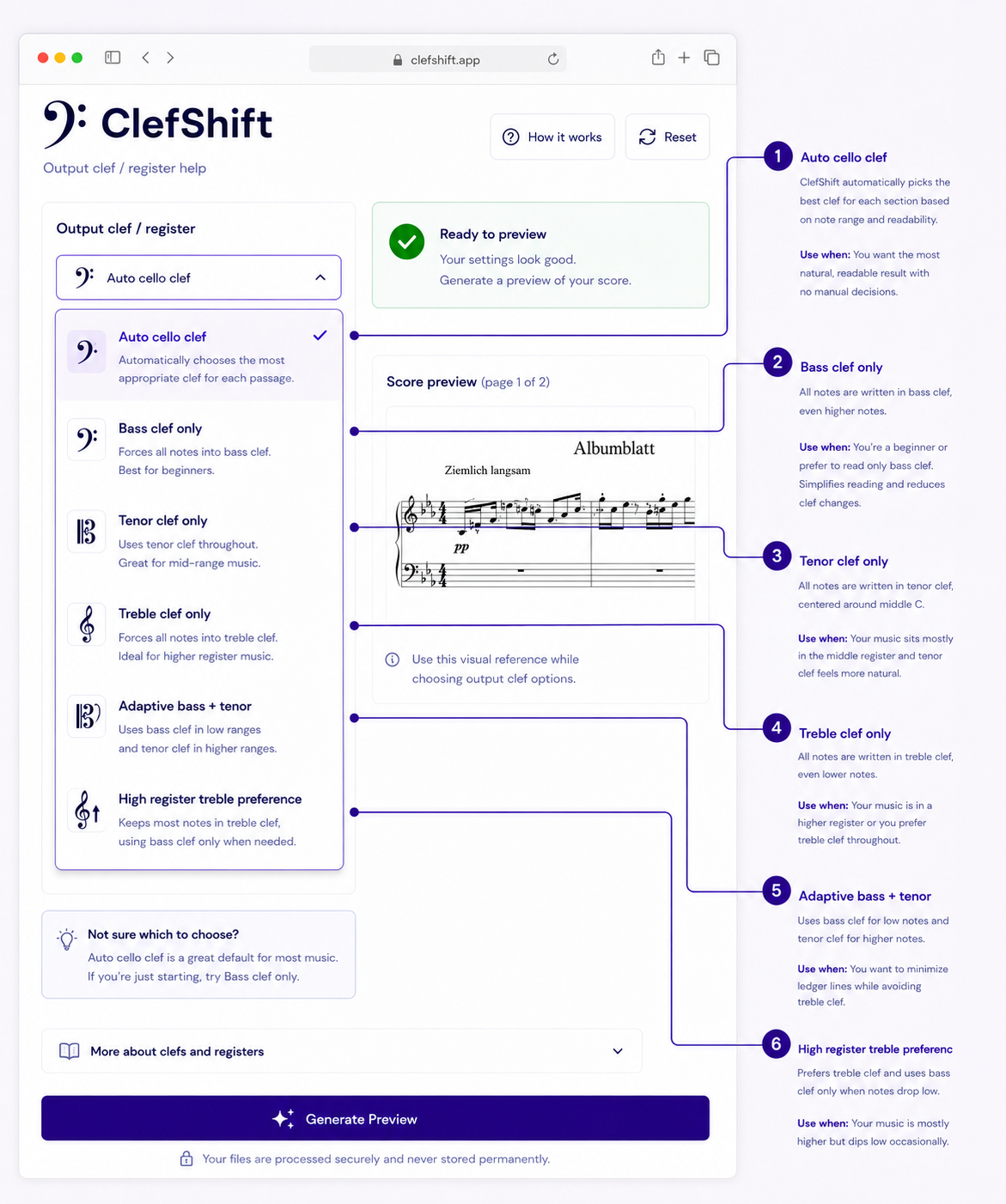
Transforming sheet music into playable cello arrangements

ClefShift

A UX engineering prototype that turns uploaded notation into cello-centered, editable MusicXML drafts while making processing steps, uncertainty, and errors visible.

Contribution
Product strategy, interaction design, UX engineering
Deliverable
Adaptation pipeline prototype and guided arranging interaction design

The challenge

A score can open correctly and still be difficult to play. Adapting piano, voice, or other instrumental music for cello requires decisions about melody, register, texture, and what to leave out.

My role · Interaction designer / prototype developer

I developed the concept, interface, and music-processing workflow, then iterated through technical and musical testing. My own experience learning cello supplied the starting need: make music I care about more approachable without removing musical judgment.

View the project presentation ↗

The turning point

Successful conversion was not the same as successful adaptation. Some outputs rendered correctly but obscured the melody or produced awkward cello parts. That changed the product direction from automatic conversion to guided arranging: preserve melodic identity, reduce competing material, and let the musician inspect and revise the result.

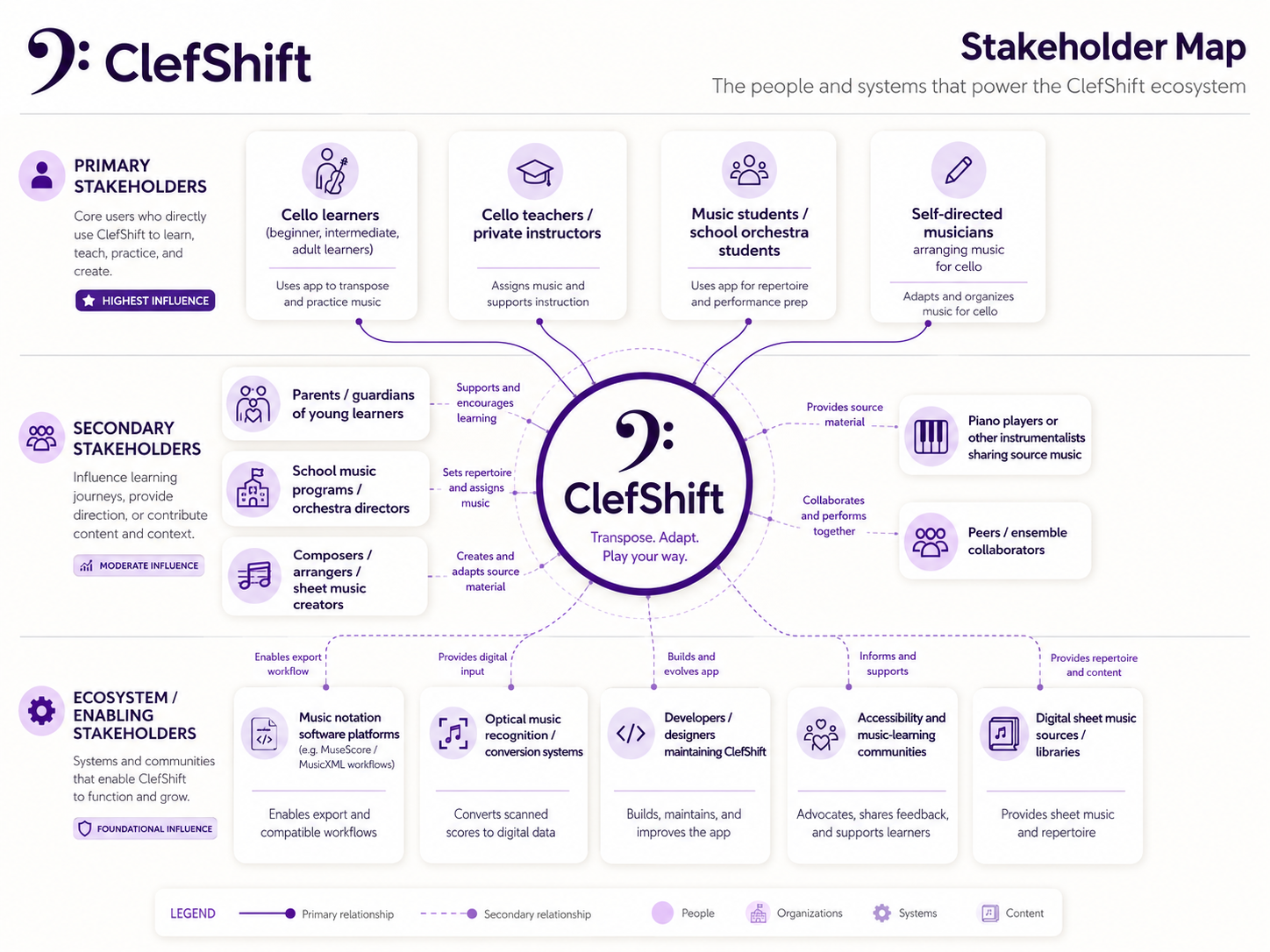
ClefShift stakeholder map connecting learners, teachers, students and musicians to supporting people, notation software, recognition systems, accessibility communities and sheet-music sources.
Stakeholder framing · People, learning contexts, and dependencies. View full-size ↗ (opens in a new tab)

01 · Design process

Frame the learning ecosystem

A useful draft must fit the way musicians already learn and work.

The stakeholder map places learners, teachers, students, and self-directed musicians alongside the people and systems that support them. It makes the handoff to notation software a product consideration, not merely an export setting. Editable MusicXML lets a draft continue into practice, instruction, and revision. The map also identifies whose feedback would strengthen future evaluation, beyond my own experience as a learner.

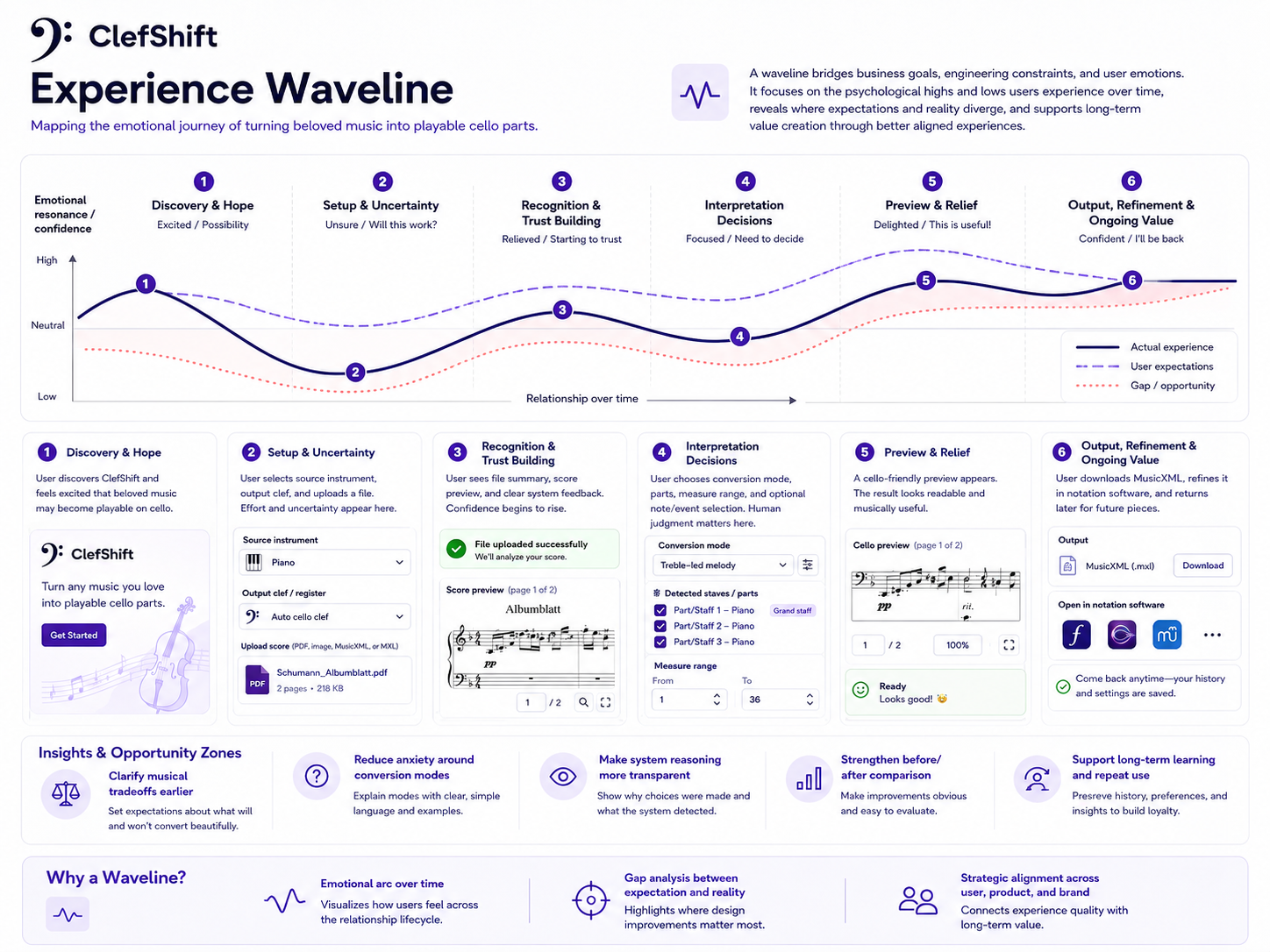
Six-stage experience waveline from discovery and setup through recognition, interpretation, preview and refinement, highlighting confidence gaps and design opportunities.
Experience model · Anticipated confidence changes, not a measured usability result. View full-size ↗ (opens in a new tab)

02 · Design process

Design for uncertainty across the journey

The hardest moments are setup and interpretation.

The experience waveline maps where confidence may fall as a musician uploads a score, chooses settings, and decides which material to preserve. It identifies opportunities for plain-language explanations, visible recognition results, and clearer comparisons before export. I use this as a design hypothesis about the emotional journey, rather than measured satisfaction data. It gives the interface a practical job at each stage: confirm what happened, explain the next decision, and make recovery possible.

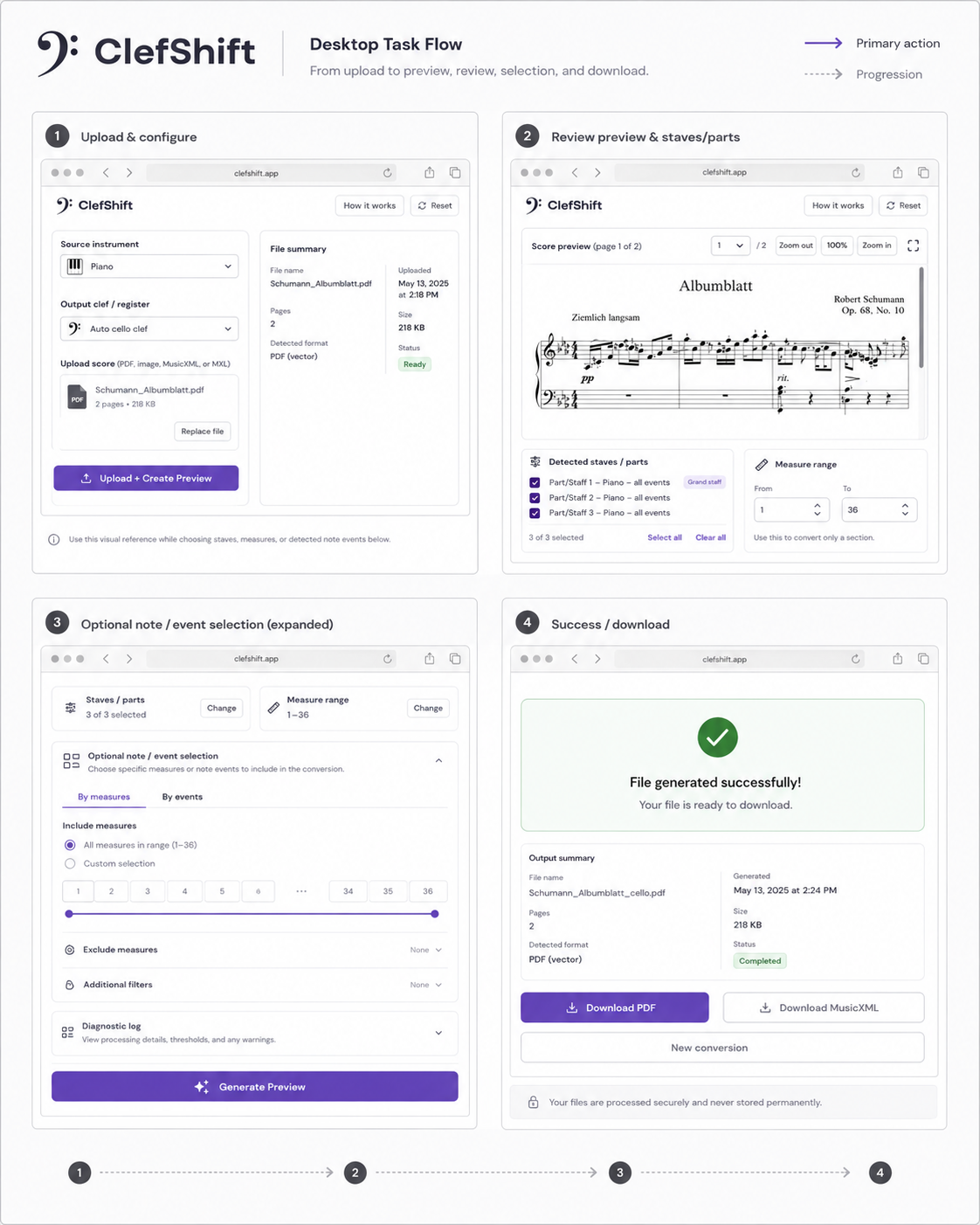
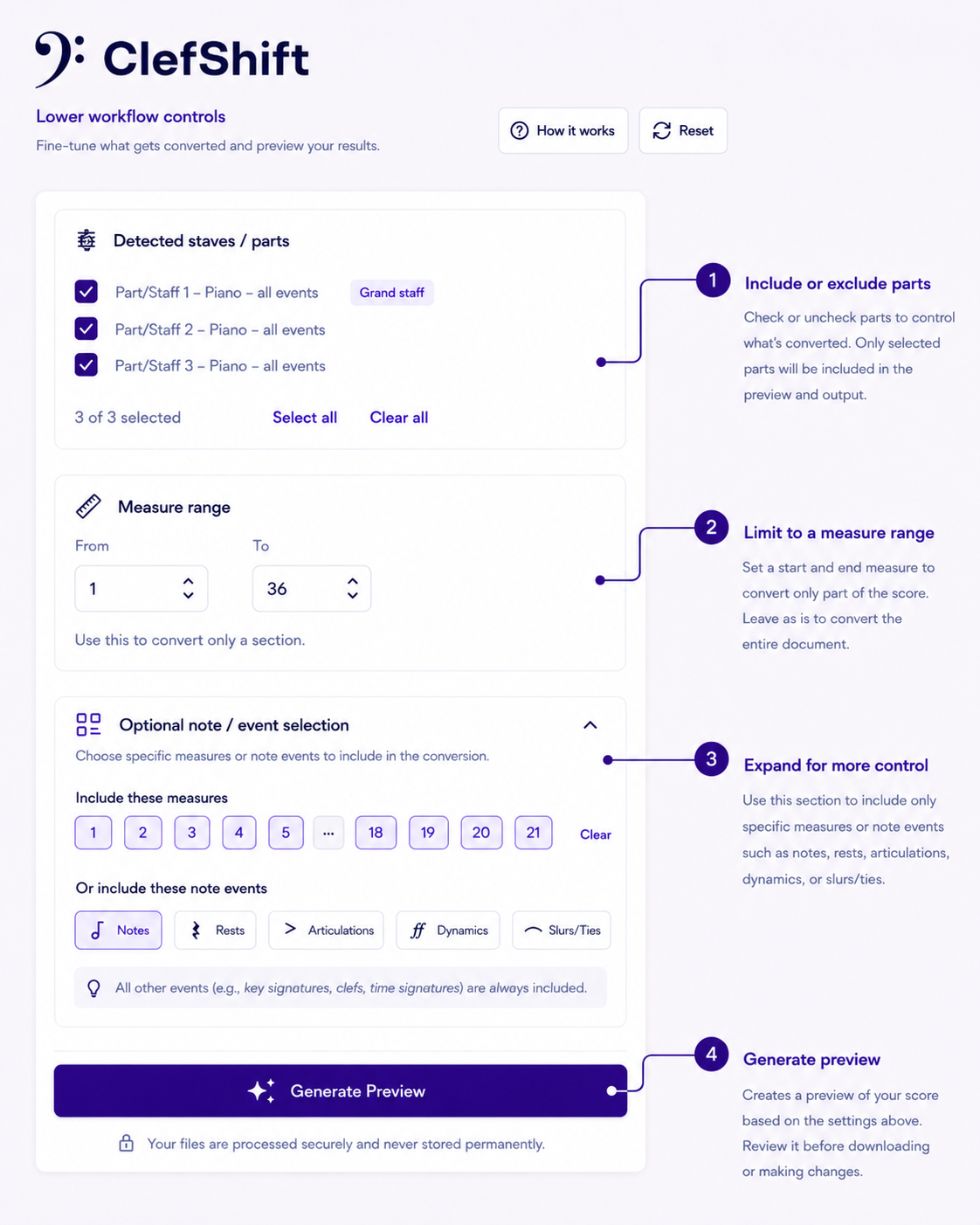
Four-screen desktop task flow showing upload and configuration, score and part review, optional selection, then output and download.
Interaction concept · The intended end-to-end desktop workflow. View full-size ↗ (opens in a new tab)

03 · Design process

Make the workflow inspectable

Upload → review → select → generate and export.

The task flow breaks a complex transformation into decisions the musician can understand. File confirmation establishes what entered the system; review exposes the source and detected parts; optional controls narrow the material; output provides a route into continued editing. This staged structure supports checking and revising assumptions before accepting a result. The screens communicate the intended interaction design; the presentation identifies in-browser notation preview and direct note selection as further development opportunities.

04 · Interaction decisions

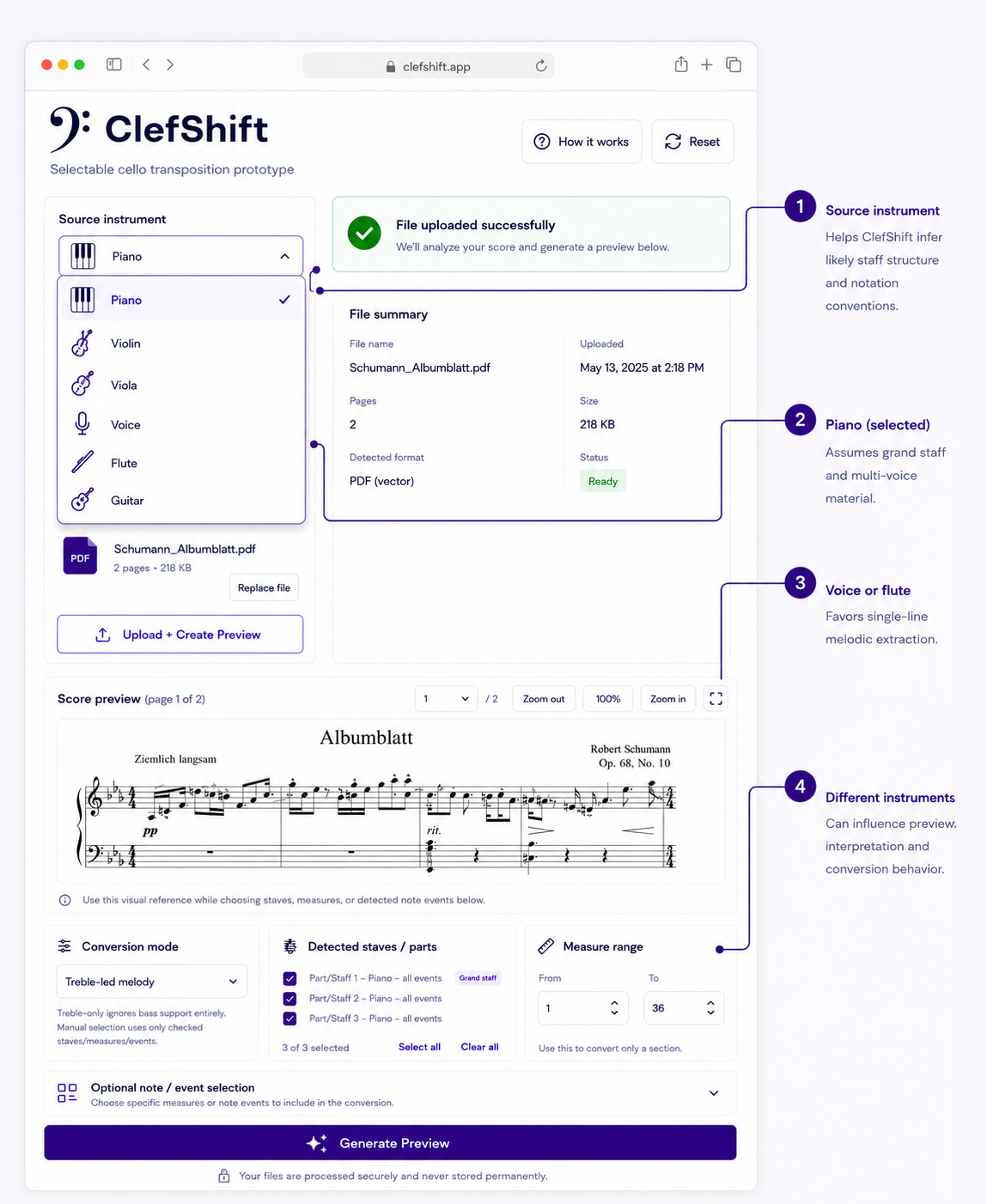
Give the musician useful control

Make choices understandable before making them powerful.

Source-instrument context helps explain interpretation. Clef guidance connects technical settings to reading comfort. Part, measure, and event selection let musicians narrow the material without confronting every control at once. These annotated concepts show how defaults, contextual help, and progressive disclosure can support both a straightforward path and more deliberate arranging.

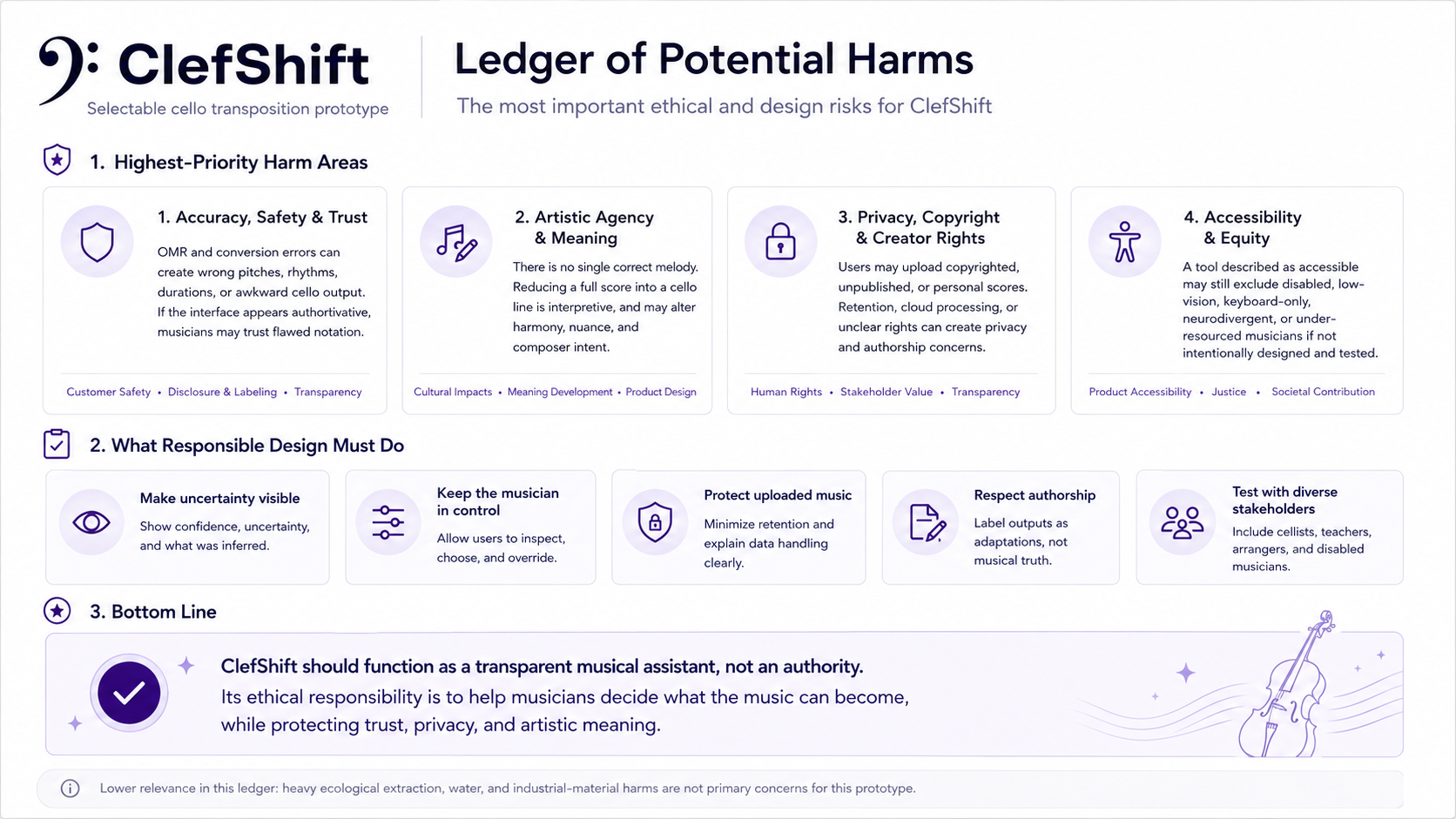
Ledger of potential harms covering accuracy and trust, artistic agency, privacy and copyright, accessibility, and corresponding responsible-design actions.
Risk-informed product design · Requirements for trustworthy adaptation. View full-size ↗ (opens in a new tab)

05 · Design process

Treat trust as a design requirement

A polished interface must not imply musical certainty.

The harms ledger considers incorrect notation, loss of artistic intent, uploaded-score privacy, creator rights, and exclusion of musicians with different access needs. It translates those risks into requirements: expose uncertainty, allow overrides, explain data handling, and evaluate with diverse musicians. These are responsibilities to design and validate, not assurances established by the mockups. In particular, interface statements about secure processing or retention need to match the implemented system.

06 · Iteration and outcome

Turn failures into requirements

  • Recognition failed on poor scans → preprocessing and fallback handling.
  • Piano parts duplicated or obscured the melody → selective stave handling and melodic extraction.
  • Chords became unplayable → single-note reduction.
  • Processing appeared frozen → job-based progress feedback.
  • The wrong material was selected → user-controlled conversion modes.
  • Ties and slurs were incorrect → notation cleanup before export.

The outcome is a cello-focused technical prototype and a clearer interaction model for guided adaptation. Testing through prototype runs and musical review informed the direction; it does not establish broad usability validation. Next steps include in-browser notation review, audio playback, side-by-side comparison, and phrase-aware extraction.

Implementation context

HTML, CSS, JavaScript, Python/FastAPI, Audiveris optical music recognition, music21, MusicXML, and MuseScore.

Design principleThe algorithm informs. The musician decides.

03

Climate systemsService designUsability testing

Making energy decisions actionable for renters and owners

Power in Common

Beginning with Solar by Nest, a brand collaboration concept, our systems research evolved into Civic Energy: a website that helps renters advocate for better energy solutions and building owners make informed decisions.

Contribution
Service design, stakeholder mapping, usability research
Status
Completed · Research-to-website graduate project
Outcome
Civic Energy · Renter and building-owner website
Evidence
Four moderated usability sessions
Explore Civic Energy (opens in a new tab)

The outcome · Civic Energy

One energy landscape. Two paths to action.

Our research became a website for the people who live in a building and the people who can change it. Civic Energy translates an intimidating energy landscape into relevant benefits, understandable options, and concrete next steps.

Project evolution · From brand collaboration to public-facing advocacy

Solar by Nest began as a brand collaboration concept and the central theme of our early exploration. It gave the team a starting point for imagining how solar, housing, and connected-home services could work together. As we mapped stakeholder relationships and explored renter and building-owner needs, the project expanded beyond that initial brand framing.

The final website, Civic Energy, shifts the emphasis toward advocacy and accessible information. It brings together guidance, resources, and audience-specific tools to help renters understand their options and prepare requests, while helping building owners evaluate benefits, incentives, and practical next steps. The brand collaboration was the starting concept; empowering people to navigate the energy and housing system became the focus of the final experience.

Embolden renters

A guided energy checkup starts with familiar concerns—high bills, drafts, comfort, and outages. A conversation toolkit and message builder help turn those concerns into a specific request to the person who can act.

UX intent: reduce the expertise needed to participate and help renters move from concern to advocacy.

Explore the renter journey ↗ (opens in a new tab)
Motivate building owners

The owner path connects energy upgrades to operating costs, property value, and resident benefits, with routes to incentives and an ROI estimate. It frames an infrastructure decision around the questions an owner brings to it.

UX intent: make the value proposition legible and the next step easier to evaluate.

Explore the owner journey ↗ (opens in a new tab)
Civic Energy · Interactive previewOpen full website ↗ (opens in a new tab)
Explore the team’s completed graduate website. The experience presents a service concept; projected benefits and illustrative scenarios are not measured deployment outcomes. View in a separate tab ↗

From systems thinking to interaction design. The stakeholder map revealed different motivations and unequal decision-making power. The website responds through audience-based navigation, task-focused guidance, and tools that help people prepare a next step. The systems work below explains the reasoning behind that experience.

The challenge

Most clean-energy solutions assume homeownership. Renters may care about climate and energy costs, but they often cannot install solar panels, control building infrastructure, or make long-term property investments.

Process and reasoning

  • Reframed solar access from an individual homeowner product into a shared housing and infrastructure issue.
  • Mapped renters, landlords, property managers, developers, policymakers, and energy partners as connected actors.
  • Developed Solar by Nest as an initial brand collaboration and service concept connecting apartment discovery, solar, storage, incentives, and smart monitoring, before evolving the direction into Civic Energy’s information and advocacy experience.
  • Conducted four moderated usability testing sessions focused on trust, navigation, comprehension, and next steps.

01 · Systems process

Mapping the energy ecosystem

Access depends on more than a device.

I mapped household energy use alongside utilities, smart-home platforms, installers, community solar groups, and the forces shaping them: pricing, permitting, financing, privacy, housing inequality, and cultural norms. The map exposed a mismatch between the promise of real-time energy control and the conditions required to exercise it. A household could monitor consumption yet still lack permission, capital, or access to shared generation.

That shifted the design from an isolated monitoring tool toward a service connecting information to feasible action. For renters, the question became: what can someone actually change when they do not own the building?

The broader ecosystem: household choices depend on infrastructure, institutions, and access. View full-resolution map (opens in a new tab)↗

02 · Systems process

Refining relationships and leverage

Renter motivation and decision-making power are separated.

The focused map distinguishes tenants, landlords, developers, and policymakers, then traces five relationship types: support, restriction, regulation, influence, and financial flow. Separating these connections made the imbalance visible: tenants experience energy costs while installation approval, building rules, financing, and utility integration sit across other actors. Advocacy organizations and local government also emerge as potential sources of support.

This changed the service structure. A single adoption journey could not address every stakeholder’s incentives or authority. Solar by Nest needed renter and landlord pathways, visible eligibility requirements, and practical explanations of costs and implementation. The map became a way to identify dependencies the interface must clarify, rather than hide behind a simple “go solar” promise.

The focused model: authority, incentives, and support sit in different parts of the system. View full-resolution map (opens in a new tab)↗

03 · Intervention strategy

Translating the map into a service

Turn system dependencies into decisions people can act on.

The maps connected three design needs: help renters find viable options, help property owners assess feasibility, and make the path between interest and implementation understandable. These became the service priorities for Solar by Nest.

  • Limited control over housing → apartment discovery. Connect energy access to places renters can choose.
  • Different authority and incentives → role-based pathways. Surface affordability for renters and implementation, ROI, and risk for landlords.
  • Distributed rules and financial dependencies → eligibility and transparent estimates. Explain assumptions and next steps before asking for commitment.

Four moderated usability sessions then brought this strategy back to practical concerns: participants needed credible savings, clearer language, and confidence about what to do next.

04 · Systems process

Deflection Point: current to preferred future

A better interface is one step toward a different energy system.

The Deflection Point exercise separates a continuing trajectory—centralized energy, rising renter costs, restrictive housing arrangements, and individual consumption—from a preferred future of shared infrastructure, community ownership, repair, and collective resilience. Emerging shifts, including balcony solar, energy-sharing platforms, cooperative models, and renewable-energy incentives, sit between those trajectories as possible openings for change.

This sharpened the intervention’s ambition and limits. Solar by Nest connects near-term decisions about housing, eligibility, and savings to a longer-term direction of renter agency and shared participation. The preferred future supplies criteria for evaluating the concept: does it widen access, make dependencies visible, and support collective benefit? It is a strategic direction, not evidence that those systemic outcomes have already occurred.

Current conditions, emerging shifts, and preferred futures across people, operations, technology, policy, ownership, culture, and the built environment. View full-resolution Deflection Point (opens in a new tab)↗

Constraints

Renters often do not control building infrastructure, while landlords need evidence around ROI, incentives, safety, risk, and implementation. The design also had to work within policy constraints, technical solar language, stakeholder power imbalances, and the limits of a formative prototype.

Design decisions

  • Led with practical outcomes such as bills, reliability, housing quality, ROI, and risk reduction.
  • Made apartment discovery central so clean energy became connected to real housing choices.
  • Created role-based pathways because renters and landlords evaluate the same system differently.
  • Treated trust as infrastructure through proof, transparency, examples, assumptions, and clear next steps.

Intervention concepts

Role-based onboarding Apartment discovery Savings estimates Eligibility tools Trust layers Community dashboards

Completed project · Testing and outcome

Our research culminated in the Civic Energy website for renters and building owners, building on the Solar by Nest service concept and systems models. Four moderated sessions evaluated the formative prototype. Testing showed that participants understood the mission, but understanding was not enough. Renters wanted affordability, housing quality, and savings. Landlords wanted ROI, implementation clarity, and risk reduction. The strongest opportunities became role-based pathways, transparent savings estimates, eligibility checks, cited data, testimonials, simpler language, and clearer calls to action.

Key insight The design problem was not awareness. It was the gap between understanding clean energy and feeling confident enough to act within a housing system full of constraints.

04

AccessibilityQualitative researchSystems mapping
Healthcare access: beneath the surface An iceberg connects visible delays and confusion to recurring shortages, institutional barriers, and assumptions about disability. HEALTHCARE ACCESS · BENEATH THE SURFACE 01 / EVENTSDelays, confusion, disconnected care 02 / PATTERNSWorkforce shortages and long waits 03 / STRUCTURESPolicy, funding, and unequal influence 04 / MENTAL MODELSAssumptions about disability and support

Investigating invisible barriers to care

Accessible Healthcare Systems

Disability-centered research and systems mapping exploring how fragmented services, paperwork, stigma, transportation, and institutional handoffs compound over time.

Contribution
Qualitative research, synthesis, systems mapping
Deliverable
Root-cause analysis, stakeholder map, and theory of change

The challenge

Access rarely breaks at one point. Barriers emerge through interactions between healthcare, housing, education, transportation, benefits, accommodations, paperwork, disclosure, and expectations of constant self-advocacy.

Process and reasoning

  • Conducted disability-centered interviews about accommodations, housing, paperwork, stigma, and support.
  • Synthesized patterns into stakeholder maps, journey logic, systems maps, and root-cause analysis.
  • Framed paperwork, legal language, and repeated documentation as access barriers, not neutral admin steps.
  • Mapped how handoffs between agencies, providers, offices, advocates, and transportation systems create friction.

01 · Research to design

Identify the causes behind the friction

Accessibility failures extend beyond the interface.

The fishbone analysis organizes barriers into six connected areas: policy, institutions, social attitudes, technology, workforce, and communication. It brings inaccessible tools into the same frame as insurance restrictions, fragmented care, medical jargon, and the devaluation of lived experience. This makes the design problem more precise: improving a screen cannot resolve a service that still requires people to navigate disconnected rules and repeat their needs.

For product and service design, the implication is to address both the interaction and the conditions around it. Plain language, accessible formats, and clearer handoffs become part of the core experience, alongside the institutional changes needed to support them.

Healthcare access · Root-cause analysisSix domains → one systemic outcome
Policy & regulation
  • Inadequate disability protections
  • Fragmented policy
  • Lack of enforcement
Institutional systems
  • Insurance restrictions
  • Cost barriers
  • Fragmented care coordination
Cultural & social attitudes
  • Ableism
  • Bias in medical training
  • Devaluation of lived experience
Technology & infrastructure
  • Inaccessible digital tools
  • Poorly designed devices
  • Lack of inclusive design
Healthcare workforce
  • Lack of disability training
  • Time constraints
  • Burnout
Communication & information
  • Medical jargon
  • Lack of accessible formats
  • Poor patient-provider communication
Systemic outcome

Systemic inequity in healthcare for individuals with disabilities

Root-cause synthesis · Six sources of friction, one interconnected access problem. View original diagram ↗ (opens in a new tab)

02 · Beneath the surface

From visible friction to underlying beliefs

Repeated access problems point to deeper design conditions.

The iceberg model connects visible delays and disconnected services to recurring patterns, institutional structures, and assumptions about disability. Reading downward changes the design question from “How can someone navigate this process?” to “Why does the process demand so much from them?” It complements the root-cause analysis by separating immediate friction from the conditions that reproduce it. For product and service design, this supports clearer navigation while keeping coordination, decision-making power, and the expectation of unsupported self-advocacy in view.

Accessibility · Iceberg modelSurface → underlying conditions
01
Events
  • Navigation Struggles/Administrative Burden: Extreme delays and confusion
  • Service Gaps: Existing support programs don’t address barriers to entry (lack of accessible transportation, digital inaccessibility, physical barriers in medical facilities)
  • Fragmented Experiences: Single individuals have to navigate completely disconnected agencies and organizations
02
Patterns
  • Workforce Shortages: worsening, less and less Direct Support Professionals and home health aides due to low wages + high turnover
  • HBCS Waitlist: Trends towards Home and Community-Based Services, but demand is overpowering supply → thousands are waitlisted for years
  • Growing Demographics: ~27% of adults have a disability, putting strain on already weak systems
03
Structures
  • Institutional Bias in Medicaid: Institutional care mandatory with Medicaid, but HCBS is an optional waiver program → funnels money away from community and integration
  • Asset Limits: Programs like Supplemental Security Income (SSI) and Medicaid have harsh asset limits → almost forcing poverty for individuals who need the right treatment
  • Power & Representation Imbalance: State governments, federal agencies, private care organizations hold structural power over service design and funding → individuals with disabilities have little to no influence
04
Mental models
  • Medical vs. Social Models: Current systems largely still rooted in idea that disabilities are “defects”, hasn’t recognized that people are also disabled by inaccessible systems and social barriers
  • Ableism & Charity Mindset: Cultural bias that views individuals with disabilities as burdens or people in need of charity rather than citizens with agency and rights
  • Independent Navigation: Social safety nets are designed around neurotypical and able-bodied assumptions that individuals in need have the cognitive and physical bandwidth to navigate complex systems without any help
  • Separation of Aging and Disability: Historical mindset that treats aging and disability as completely different issues → weakens advocacy, prevents cohesive policy-oriented solutions
Research synthesis · Original diagram content retained, including its project-era statistics and policy characterizations. View original diagram ↗

03 · Research to design

Locate the relationships that shape access

Design the handoffs, not just the touchpoints.

The stakeholder map centers a San Francisco resident with a disability, then expands through direct care, institutional infrastructure, community support, and structural forces. Labeled relationships distinguish support from harm, constraints, influence, and information exchange. The map shows why a person’s experience cannot be understood through a patient portal alone: insurers, intake staff, care teams, advocates, and policy all shape what happens next.

This sharpened the opportunity around coordination. Navigation support, consent-based information sharing, and clearer service handoffs can reduce the burden of repeatedly explaining, documenting, and advocating. The map also makes accountability a design question: who can remove a barrier, and whose participation is needed before a proposed solution can work?

Healthcare access · Systems mapPeople → relationships → structural forces
Stakeholder synthesis · Trace the resident’s experience across care, institutions, community, and policy. View full-resolution artifact ↗ (opens in a new tab)

04 · Research to design

Turn the analysis into a theory of change

Connect proposed interventions to the outcomes they should enable.

The theory of change sets out a five-stage pathway: center lived experience, co-create accessible systems, strengthen capacity, influence wider systems, and pursue equitable outcomes. It connects practical interventions—accessible digital experiences, inclusive communication, provider training, and better coordination—to longer-term participation, dignity, and choice.

For design, this provides a decision framework: whose experience informs the work, which barrier does an intervention address, and what would meaningful improvement look like? It keeps co-design and disability-led participation foundational rather than treating accessibility as a final review. These are proposed pathways and intended outcomes, not claims of measured impact; they establish what future prototypes and service pilots would need to test.

Accessible systems → inclusive communities → equitable outcomes

Our theory of change

  1. 01
    Center lived experience

    Understand the barriers before defining the solution.

    Key insights we uncover
    • People with disabilities face real and systemic barriers across healthcare, insurance, education, employment, transportation, housing, digital services, and civic life.
    • Barriers are attitudinal, communication, institutional, digital, and policy-driven as well as physical.
    • Lived experience is the expert lens: solutions must be co-designed and disability-led.
    • Disability intersects with race, gender, age, income, and geography.
  2. 02
    Co-create accessible systems

    Translate lived experience into inclusive services and journeys.

    Our interventions
    • Co-create accessible services, programs, and journeys with people with disabilities.
    • Integrate Universal Design and accessibility standards into products, services, and spaces.
    • Develop inclusive digital experiences: WCAG, screen reader compatibility, plain language, and clear navigation.
    • Ensure inclusive communication: ASL, captions, Braille, plain language, and accessible formats.
    • Embed disability inclusion in procurement, hiring, vendor policies, and service delivery.
  3. 03
    Strengthen capacity

    Build resources and scalable support to remove barriers.

    How we strengthen systems
    • Train providers and organizations on disability, inclusion, equity, and respectful care.
    • Build accessible infrastructure, environments, and transportation.
    • Improve navigation and coordination across systems to reduce complexity and fragmentation.
    • Invest in data, tools, and resources to measure accessibility and equity.
    • Center trauma-informed, culturally responsive, and person-centered approaches.
  4. 04
    Influence systems

    Make accessibility standard through policy and partnership.

    Our leverage points
    • Advocate for disability-inclusive policies, standards, and enforcement.
    • Promote accountable funding and resource distribution that centers disability.
    • Shift mindsets and culture to disability inclusion and accessibility as a norm.
    • Build cross-sector partnerships and coalitions led by and with people with disabilities.
    • Use data and stories to drive systems change and continuous improvement.
  5. 05
    Achieve equitable outcomes

    Enable participation with dignity, choice, and belonging.

    The outcomes we seek
    • Equal access to healthcare, insurance, education, employment, housing, transportation, and civic life.
    • People with disabilities are valued, respected, and included in decisions that affect their lives.
    • Systems are accessible, inclusive, and responsive by design—not by exception.
    • Stronger communities where everyone can participate, contribute, and belong.
    • Dignity, independence, opportunity, and well-being for all.

Foundations that drive the work

  • Nothing about us without us
  • Disability rights and human rights
  • Equity in access; inclusion in action
  • Intersectional and culturally responsive
  • Accountability, transparency, and trust
  • Evidence, data, and continuous learning
  • Sustainability and long-term systems change
Proposed pathway · Expand each stage to explore the analysis and intended interventions.

Outcome · A framework for accessible services

Iteration happened through research validation and systems critique: revising assumptions after interviews, moving from individual pain points to structural patterns, and checking whether proposed interventions addressed root causes instead of symptoms. The final framing identifies access breakdowns and intervention areas without reducing disability support to one app or one universal solution.

Key insight Accessibility is not only a checklist. It is a relationship between people, environments, institutions, policies, language, transportation, care, and power.

05

ResearchCulture frameworksFront-end
culturedecoderapp View the microsite

Turning culture analysis into an interactive microsite

Culture Decoder: Vacation

An interactive microsite analyzing Vacation’s organizational culture through public signals, design leadership frameworks, and evidence-based interpretation.

Contribution
Research, interaction design, visual design, front-end
Deliverable
Interactive culture audit and evidence framework

The challenge

Organizational culture is hard to evaluate from the outside. Companies communicate polished values, while job seekers and designers need ways to examine what a company appears to reward, tolerate, and protect through public signals. The design challenge was to turn an ambiguous culture audit into an interactive experience users could navigate, question, and verify.

Role, tools, and scope

This was a design leadership, organizational culture analysis, and coded microsite project. I worked as researcher, interaction designer, visual designer, front-end builder, UX writer, and evidence synthesizer. I developed the concept, selected the culture frameworks, structured the information architecture, wrote the analysis, designed the visual system, and built the microsite in HTML, CSS, and JavaScript.

Methods

  • Analyzed public signals including brand behavior, product launches, hiring language, business press, and customer participation.
  • Used Schein’s Three Levels of Culture to separate visible artifacts, espoused values, and deeper assumptions.
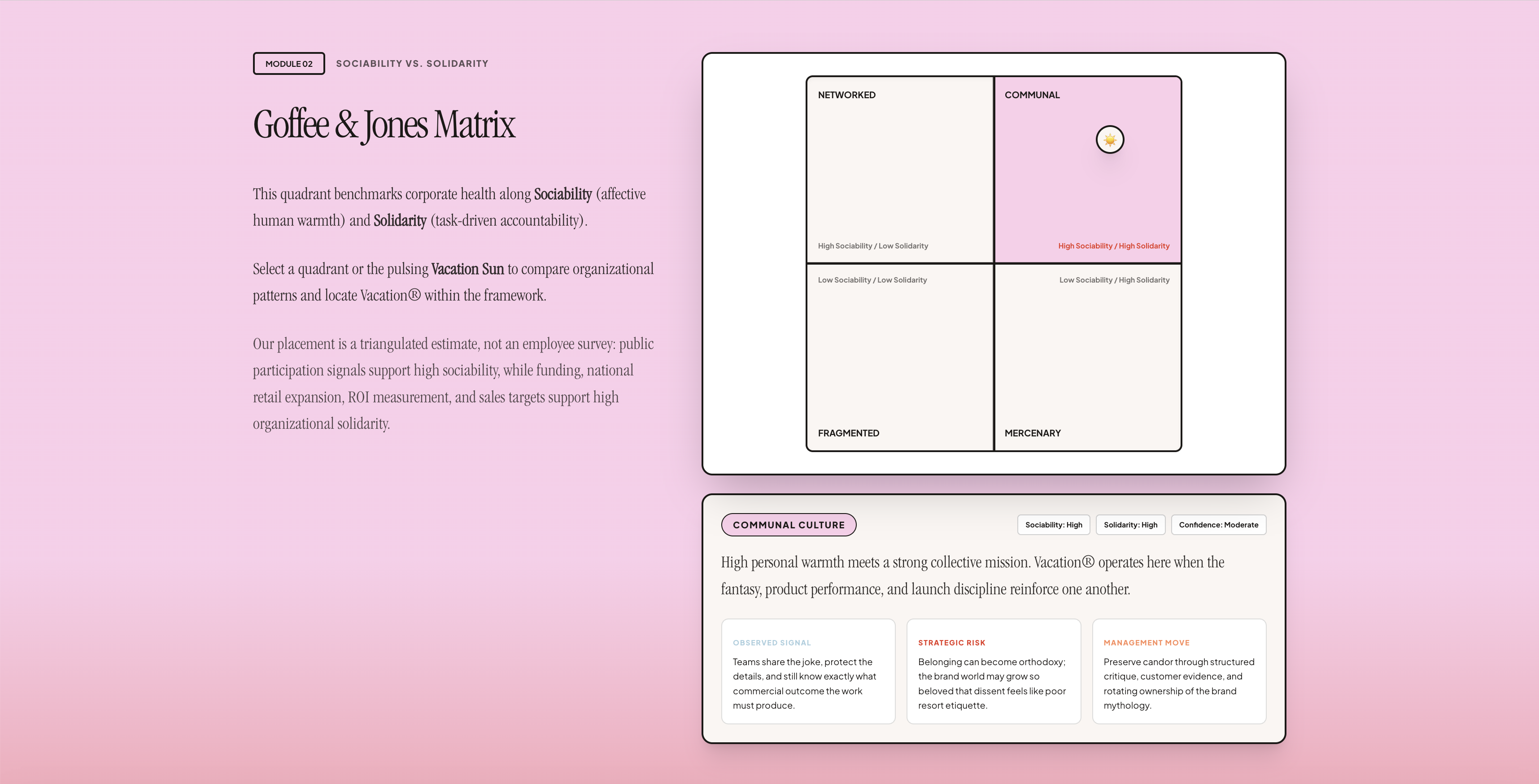
  • Applied Goffee & Jones’ Sociability vs. Solidarity Matrix to locate cultural patterns.
  • Used design maturity analysis to connect aesthetics, business capability, and organizational evidence.
  • Translated the research into a navigable microsite rather than a static report.

Interaction design decisions

  • Layered the experience so users could move from summary to framework to evidence.
  • Made abstract frameworks interactive through tabs, matrices, dials, expandable sections, and playful modules.
  • Separated claims, evidence, and research boundaries so users could evaluate the reasoning.
  • Matched the visual language to Vacation’s brand world while keeping the argument structured and legible.

Evidence and boundaries

Because this analysis relies on public signals, I framed claims as supported inferences rather than insider facts. The site makes research boundaries visible, keeps contradictory evidence in view, and avoids pretending that public brand behavior can fully prove everyday employee experience.

What I made

Interactive culture audit Schein framework module Culture matrix Design maturity dial Evidence deck Playbook spec Aesthetic synthesis Interactive appendix

A walkthrough of the microsite

From cultural frameworks to participation

These selected screens follow their order in the live microsite ↗, showing how the experience moves from interpretation and evidence to interactive artifacts.

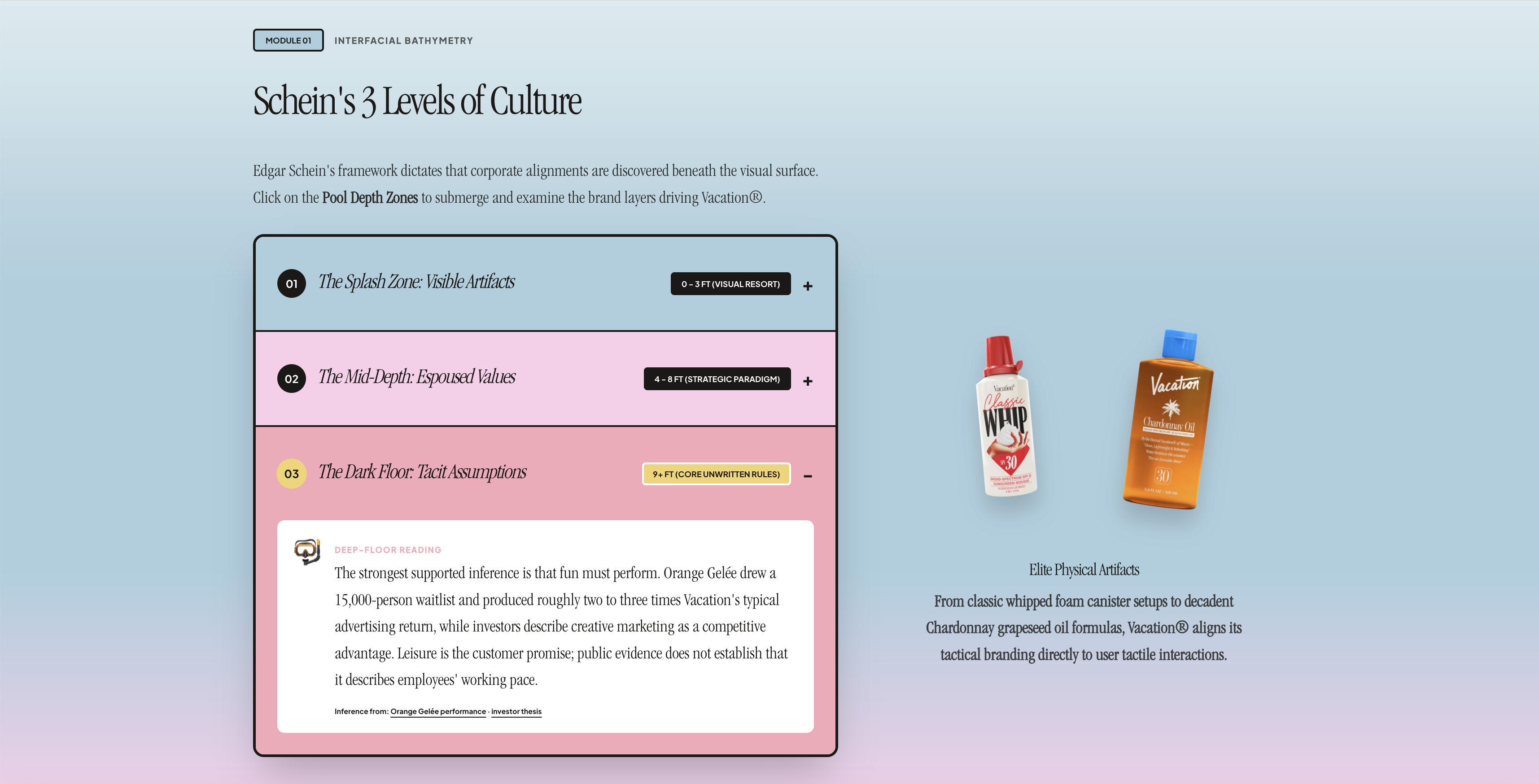
01 · culture layers

Make an abstract framework explorable

Schein’s three levels become a set of pool-depth zones, moving from visible artifacts to underlying assumptions. Product imagery keeps the conceptual model connected to tangible brand examples.

Design reasoning. The expandable layers reveal one level at a time, giving readers control over the amount of detail. The pool metaphor makes depth meaningful within Vacation’s leisure aesthetic while keeping the analytical hierarchy clear.

Vacation microsite: culture layers
Culture layers · Select the image to inspect at full size.

02 · culture matrix

Turn a classification into a comparison

The Goffee & Jones matrix positions Vacation against sociability and solidarity. Selecting a quadrant reveals a cultural reading alongside its risks and management implications.

Design reasoning. A spatial comparison makes the two dimensions easier to distinguish than a text-only explanation. Confidence labels and the stated research boundary frame the placement as an estimate based on public evidence, rather than an employee survey.

Vacation microsite: culture matrix
Culture matrix · Select the image to inspect at full size.

03 · evidence deck

Make the reasoning inspectable

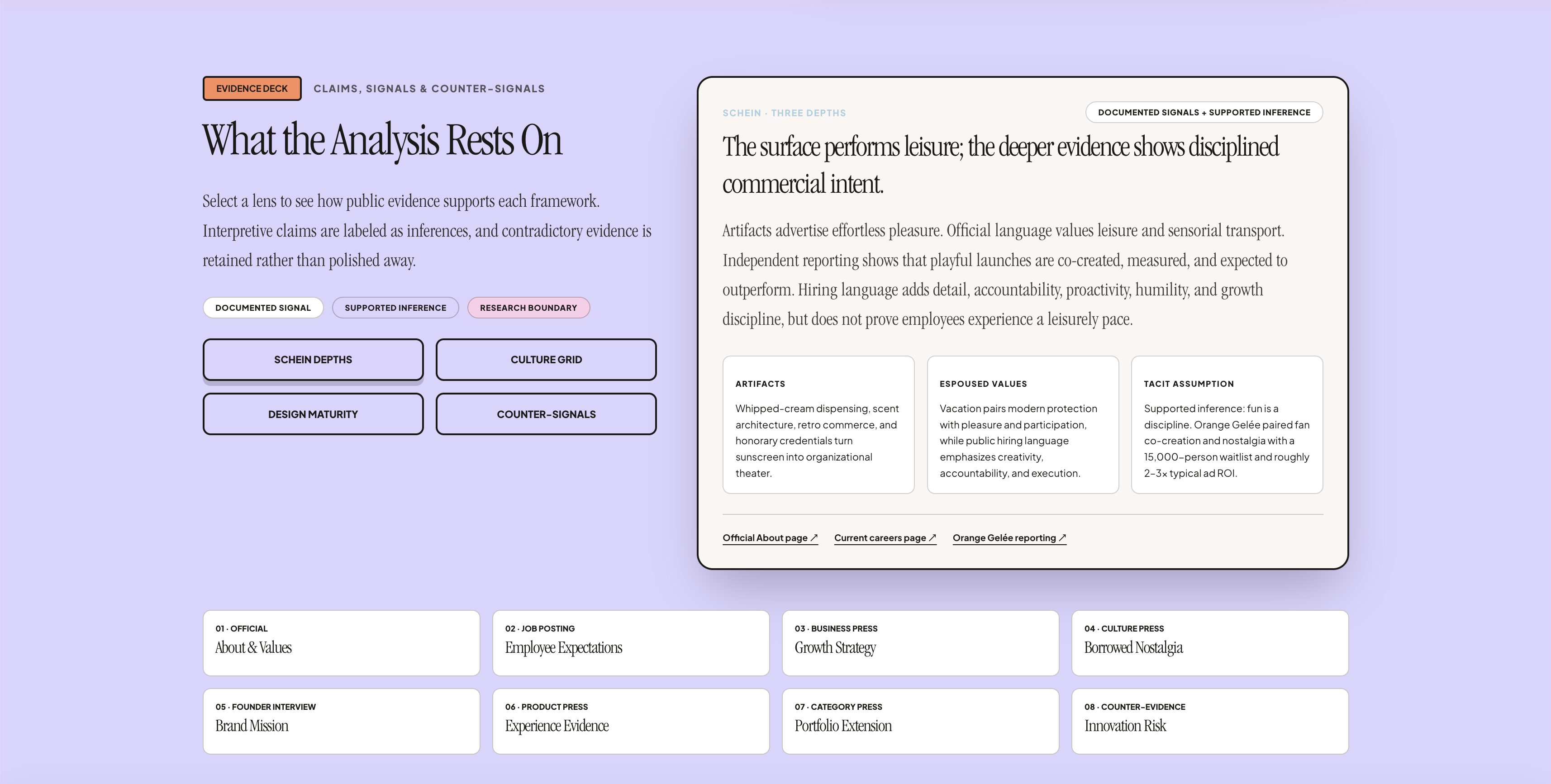
The evidence deck connects framework lenses to documented signals, supported inferences, and counter-signals. Source links give readers a route back to the material behind the argument.

Design reasoning. Keeping the filters, claim, and supporting evidence together reduces the effort of checking an interpretation. The visible confidence key makes uncertainty part of the interface, supporting critical reading rather than passive acceptance.

Vacation microsite: evidence deck
Evidence deck · Select the image to inspect at full size.

04 · behavioral playbook

Translate theory into behavioral signals

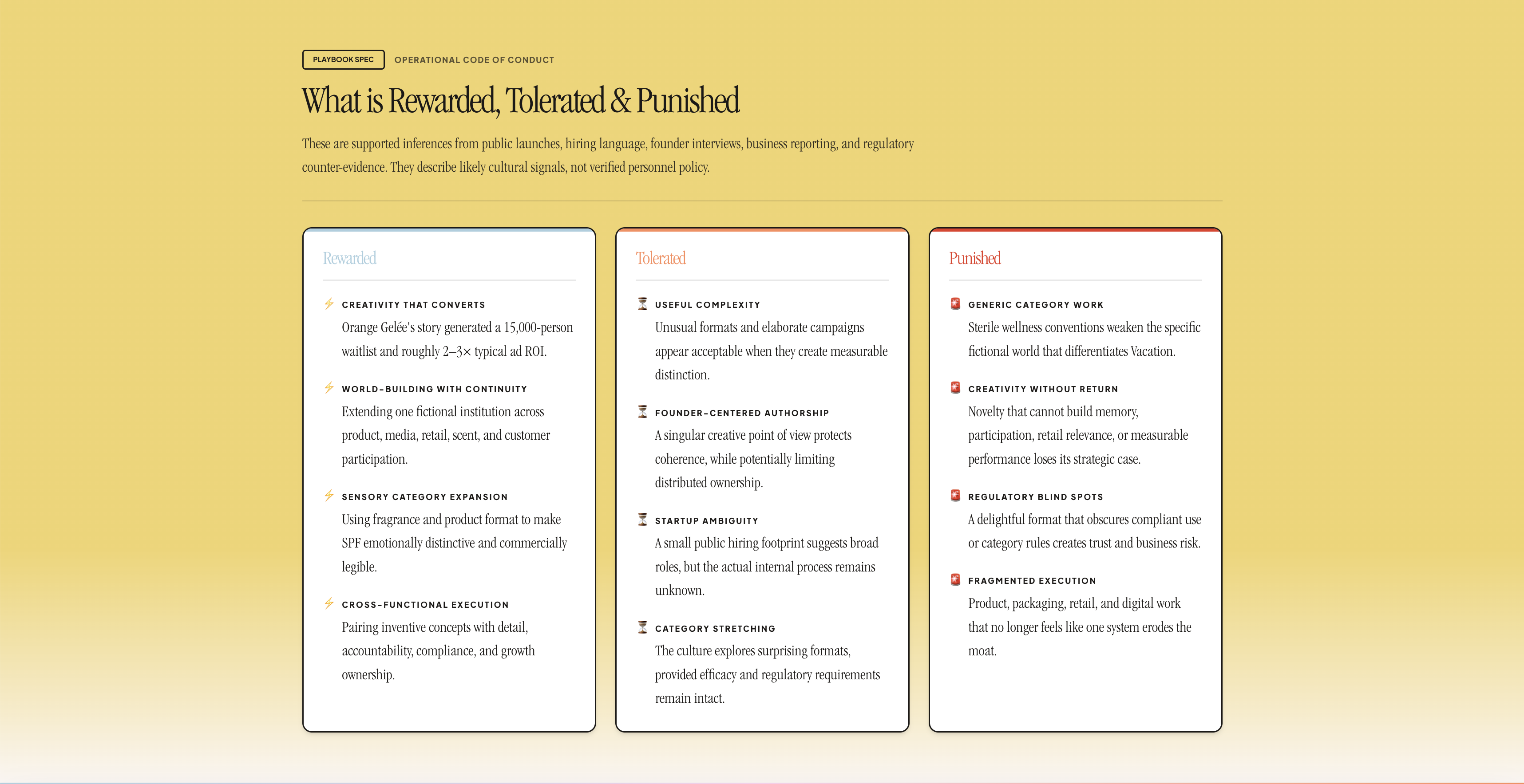
Three parallel columns organize what the analysis suggests is rewarded, tolerated, or punished. The introduction explicitly distinguishes these interpretations from verified personnel policy.

Design reasoning. The repeated column structure makes similarities and tradeoffs easy to scan. It moves the reader from broad cultural frameworks toward concrete behaviors while preserving the limits of an outside-in study.

Vacation microsite: behavioral playbook
Behavioral playbook · Select the image to inspect at full size.

05 · aesthetic synthesis

Connect visual decisions to a coherent system

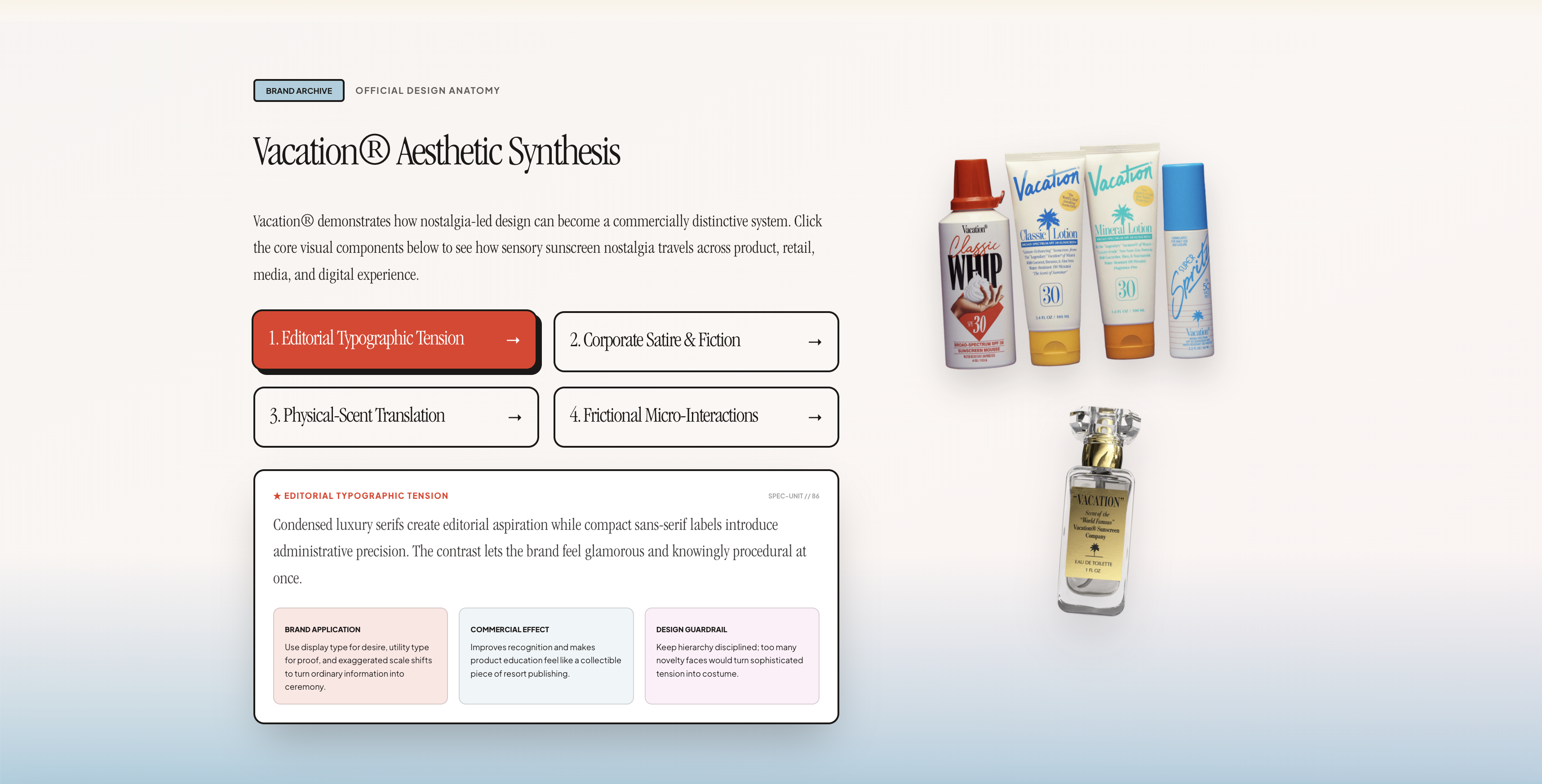
The aesthetic synthesis breaks the brand into typography, corporate fiction, sensory translation, and micro-interactions. Each selection connects a design principle to its application, commercial effect, and guardrail.

Design reasoning. Selectable lenses let the reader examine one mechanism without losing the overall structure. Pairing analysis with product imagery shows how design choices recur across physical and digital touchpoints, rather than treating the brand as a moodboard.

Vacation microsite: aesthetic synthesis
Aesthetic synthesis · Select the image to inspect at full size.

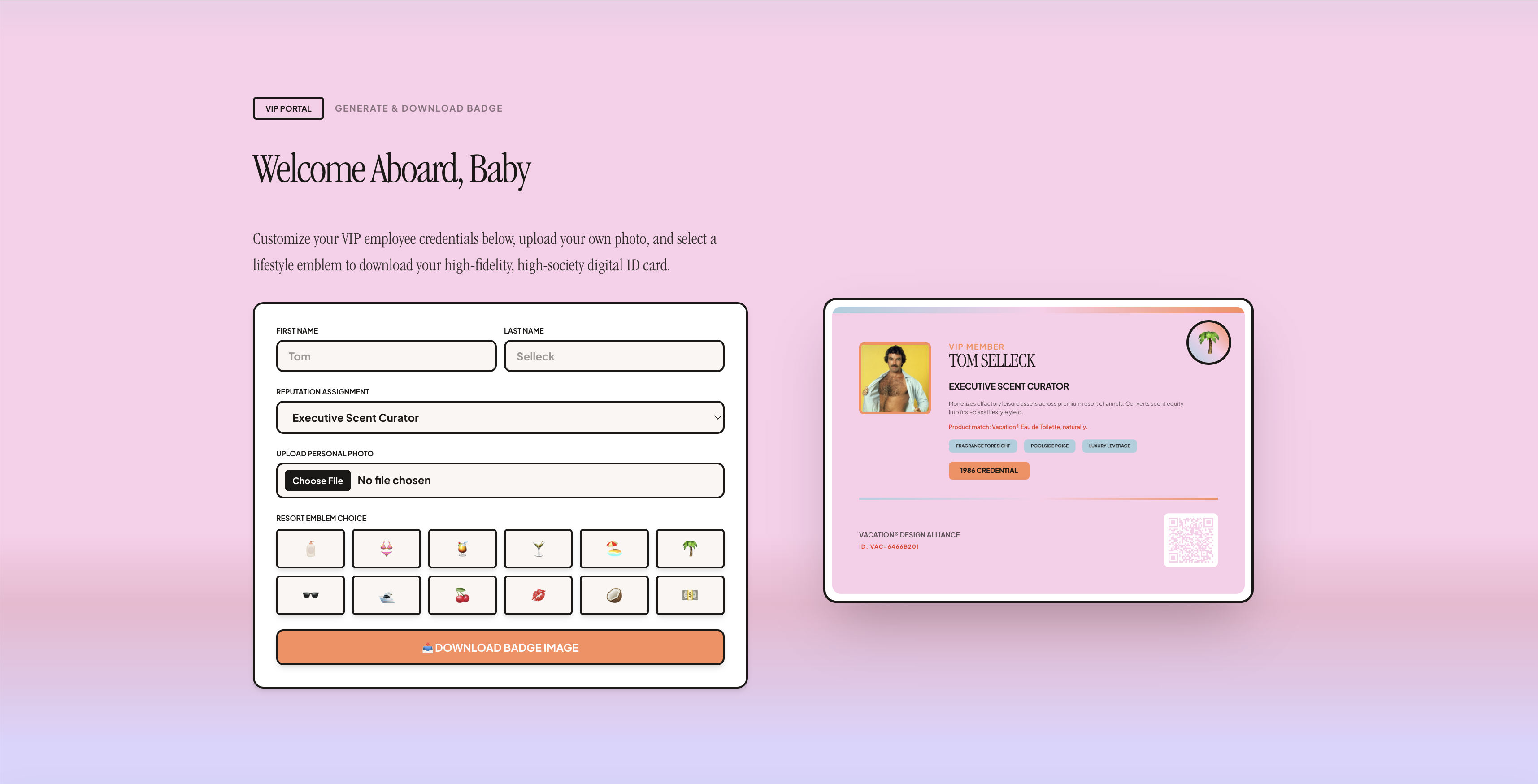
06 · badge maker

Let readers participate in the brand fiction

The VIP portal turns the honorary employee idea into a customizable badge, with name fields, role selection, a photo upload, emblem choices, and a downloadable result.

Design reasoning. A live preview makes the relationship between inputs and output visible. The badge gives readers a small act of authorship and a tangible takeaway, demonstrating the participation ritual discussed in the analysis. It functions as a playful interpretation, not additional research evidence.

Vacation microsite: badge maker
Badge maker · Select the image to inspect at full size.

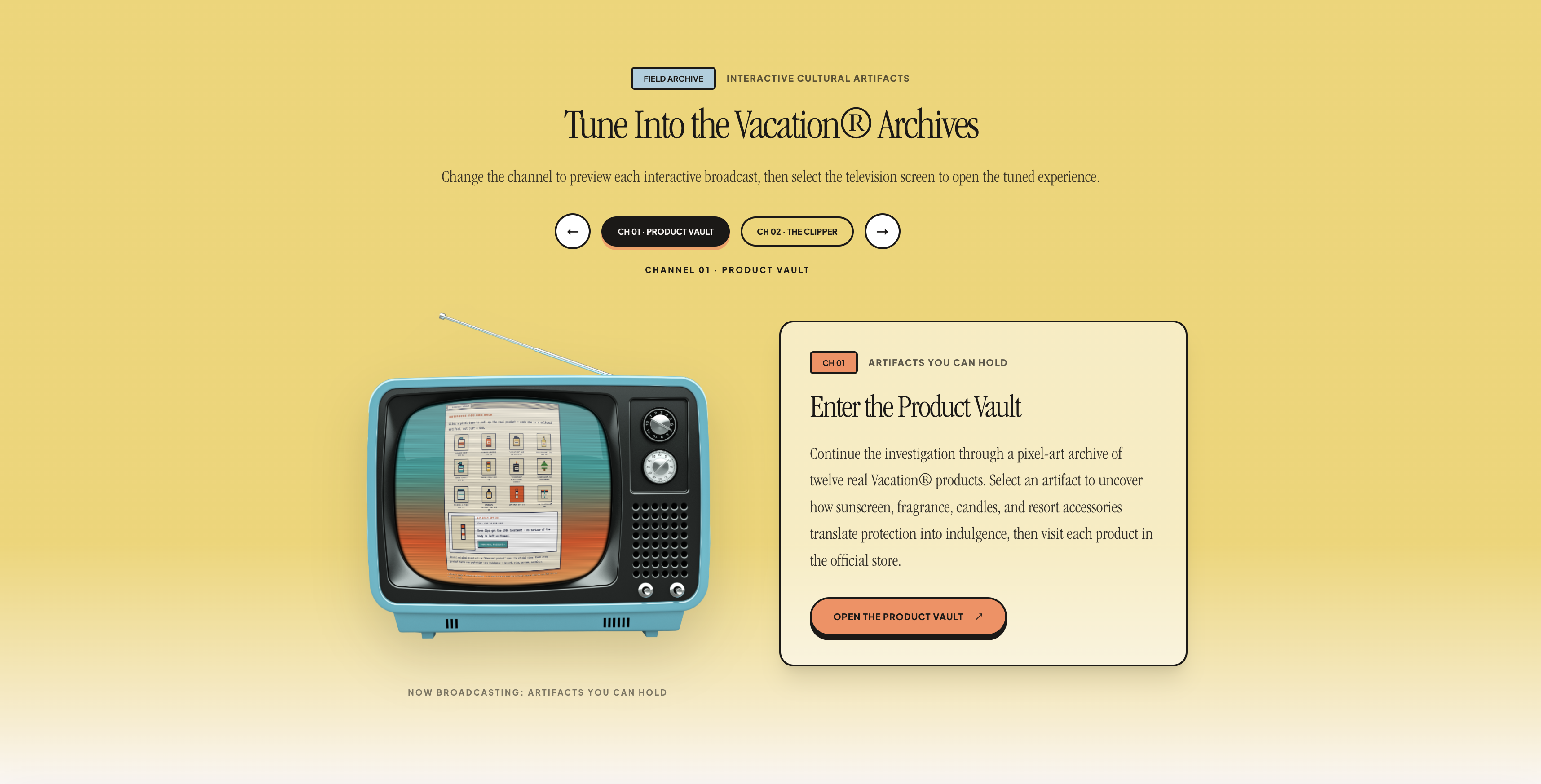
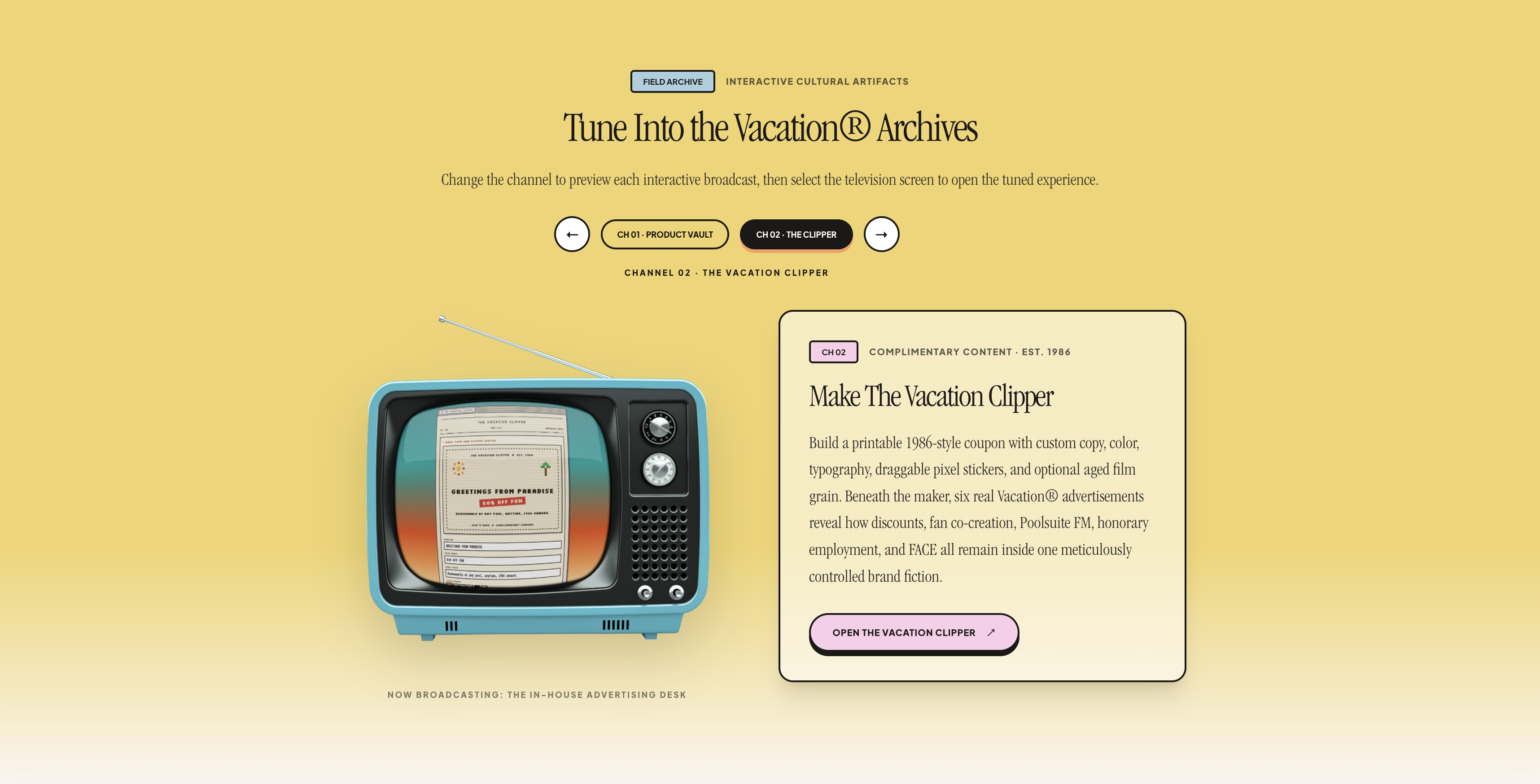
07 · Television archive

Give exploration a familiar interaction

The television brings two extensions into one place: a Product Vault for examining physical artifacts and the Vacation Clipper for creating a retro coupon. Changing channels previews the destination before the reader opens it.

Design reasoning. The channel metaphor fits the nostalgic visual language while providing a clear choice between two experiences. Keeping both destinations in the same frame supports comparison and gives the research narrative a transition into hands-on exploration.

Channel 1: Product Vault television preview
01 / Product Vault

Testing, iteration, and outcome

I tested the project through interaction and content passes, asking whether users could understand the culture hypothesis quickly, move between framework sections, scan a complex analysis, and see the evidence behind each claim. I also checked whether the playful interface supported the subject without overwhelming the argument. The final microsite translates organizational theory into a coded, visually expressive UX artifact that demonstrates research synthesis, interaction design, analytical writing, visual systems, and front-end implementation.

Why it matters for UX roles

This project shows that I can make complex, ambiguous systems understandable. It demonstrates interaction design beyond task flows: designing ways for people to explore evidence, compare frameworks, understand limitations, and form better questions before making decisions.

Key insight Interaction design can structure interpretation, not just task completion. Culture becomes easier to question when evidence, frameworks, and claims are made navigable.

03 · About & Connect

Portrait of Amanda Valverde

Warm research brain. Graphic design heart. Systems appetite.

Now

Master of Design, Interaction Design
California College of the Arts

Foundation

BA Design + BA Psychology
University of California, Davis

My background combines design, psychology, systems thinking, accessibility, and research.

I’m seeking opportunities in product design, interaction design, and UX design where thoughtful research becomes meaningful change.

Skills & areas of interest

Interaction design UX design Rapid prototyping Qualitative research Information architecture Accessibility Inclusive design Systems mapping Workflow design Civic technology Climate futures Organizational culture Service design Systems design Design strategy AI-assisted design Emerging technology Courseware production Front-end development Quality assurance Developer handoff

Let's make the complicated feel possible.

I’m interested in interaction and systems design roles where research, accessibility, and complex problem-solving matter.

Especially drawn to civic technology, climate, culture, healthcare, and creative tools.